
Blu-RAE
64x Resolution Resource Pack with Enhanced Biomes, New Designed Mobs and Villagers, Helpful Redstone Devices, Various Block Options, and New Animated…
I don't know my version or loader
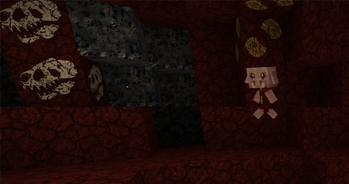
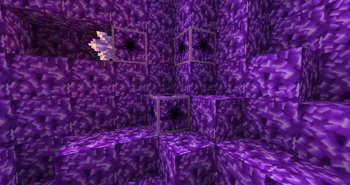
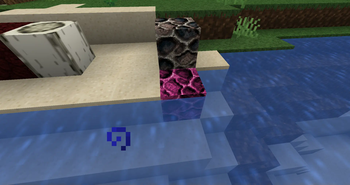
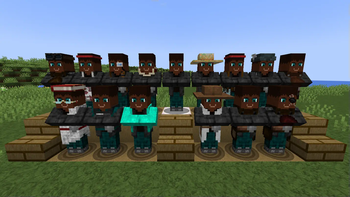
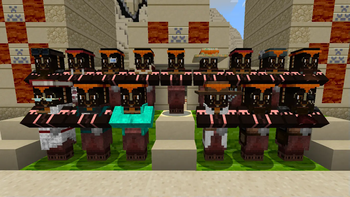
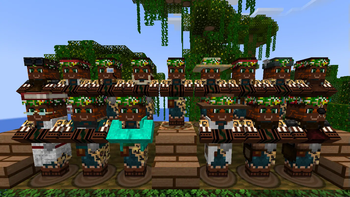
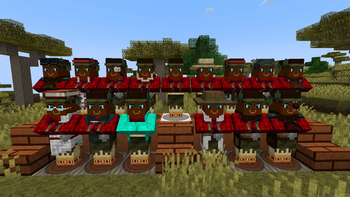
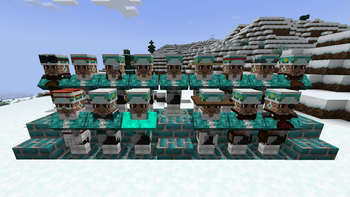

Blu-RAE is a 64x resource pack for Minecraft Java Edition with Enhanced Biomes, New Designed Mobs and Villagers, Helpful Redstone Devices, Various Block Options, and New Animated Textures.
Special Features
Here are the key features of this pack.
Texture Variation When placed, the texture you get of this block is random.
- Bookshelf
- Honeycomb Block
- All Leaves
Progress Maxed Out These textures have a "max" level to reach and that status is visibly indicated.
- Cauldron visible on the top and side based on what the cauldron is filled with.
- Amethyst Cluster this texture is also animated.
- Crops: wheat, beetroot, carrots, and potatoes
- Nether Wart
- Sweet Berry Bush
- Kelp Utilized VanillaTweaks Kelp Age 25 for a visual representation of its maxed age and recolored the flowers.
Progression Indication These textures adjust with each level of its progress from starting to maxed out.
- Bee Nest
- Beehive
- Destroy Stage Similar mining progress outline to VanillaTweaks but with an ornate design
Settings Indicator These textures have additional visual indicators highlighting the block's settings that is set by the player.
- Comparator C for Compare and S for Subtract.
- Repeater The numbers 1, 2, 3, 4 are listed on the repeater for its tick delay.
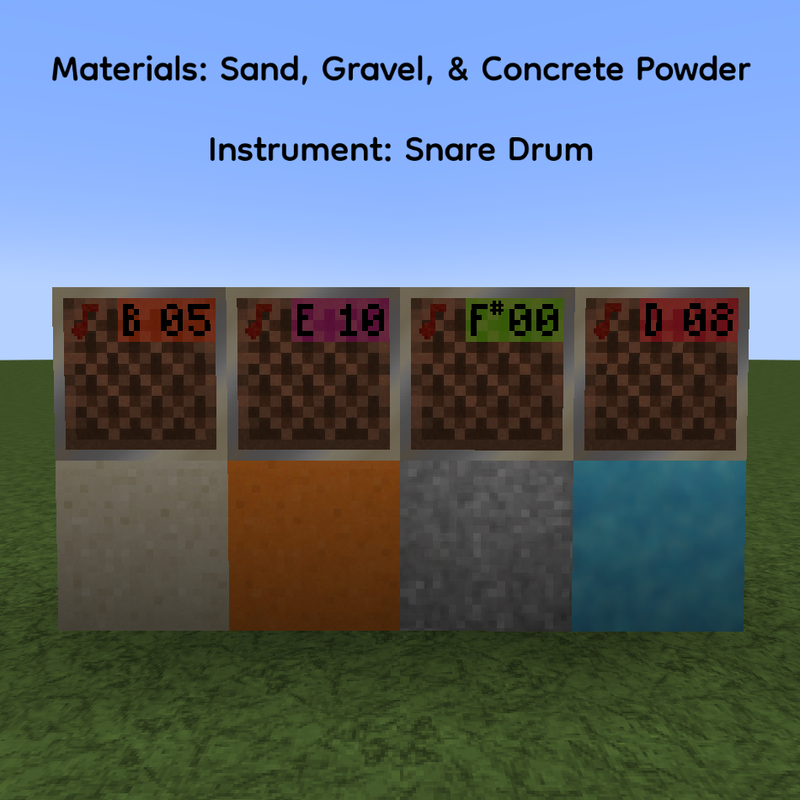
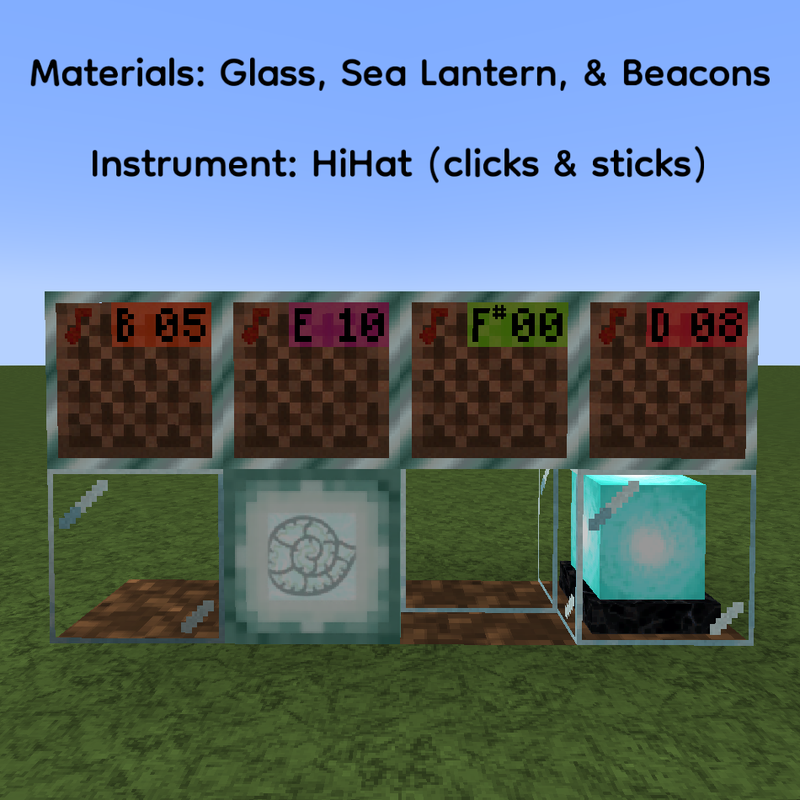
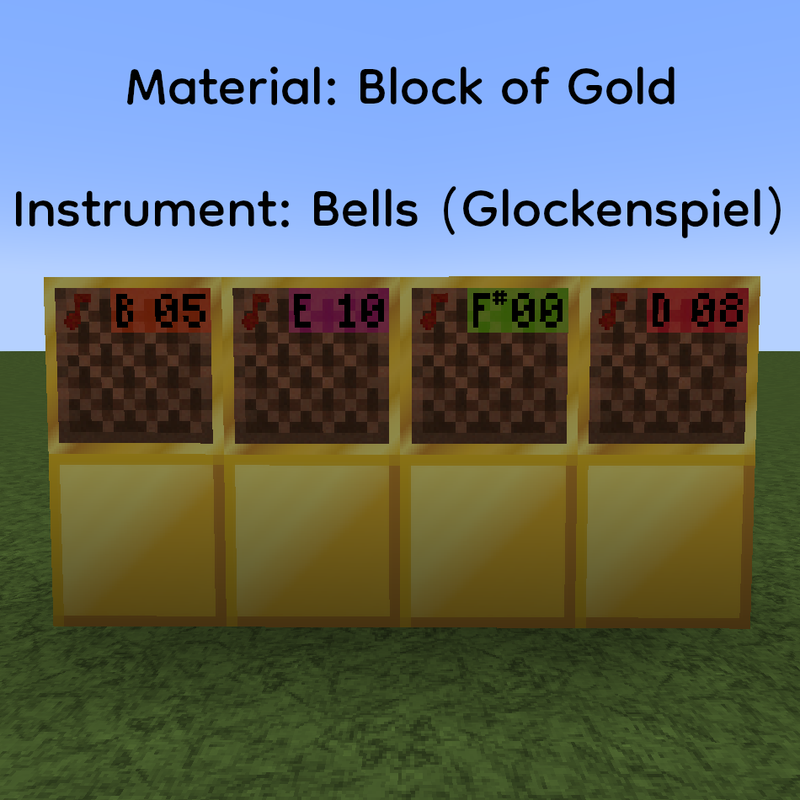
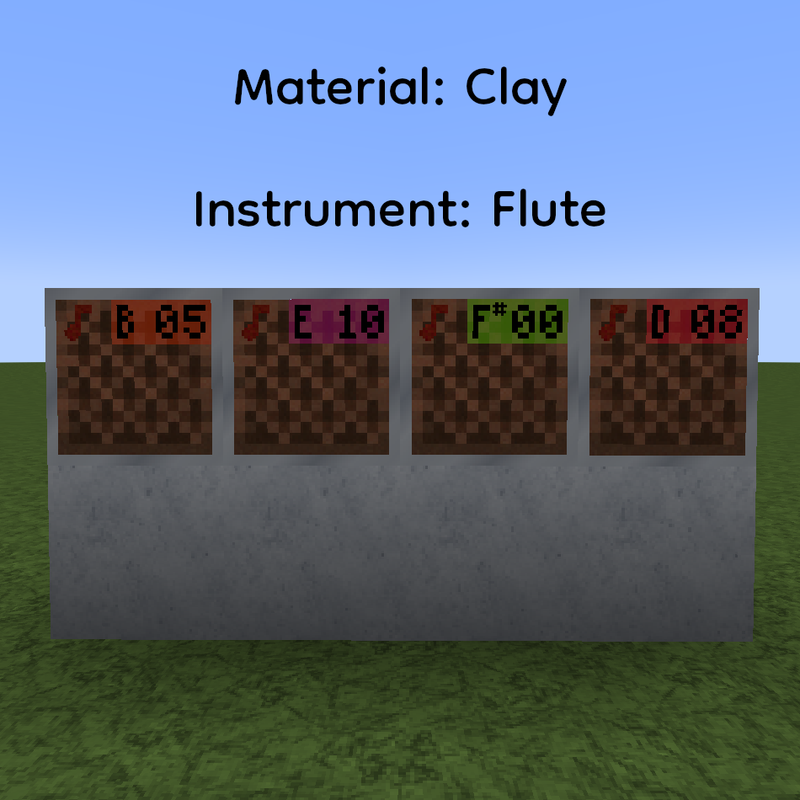
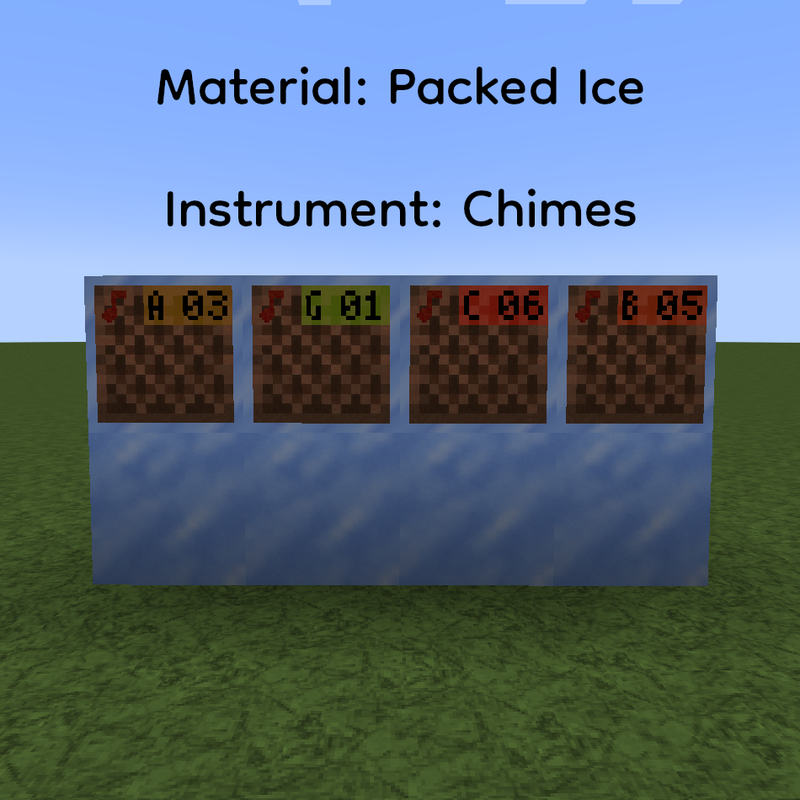
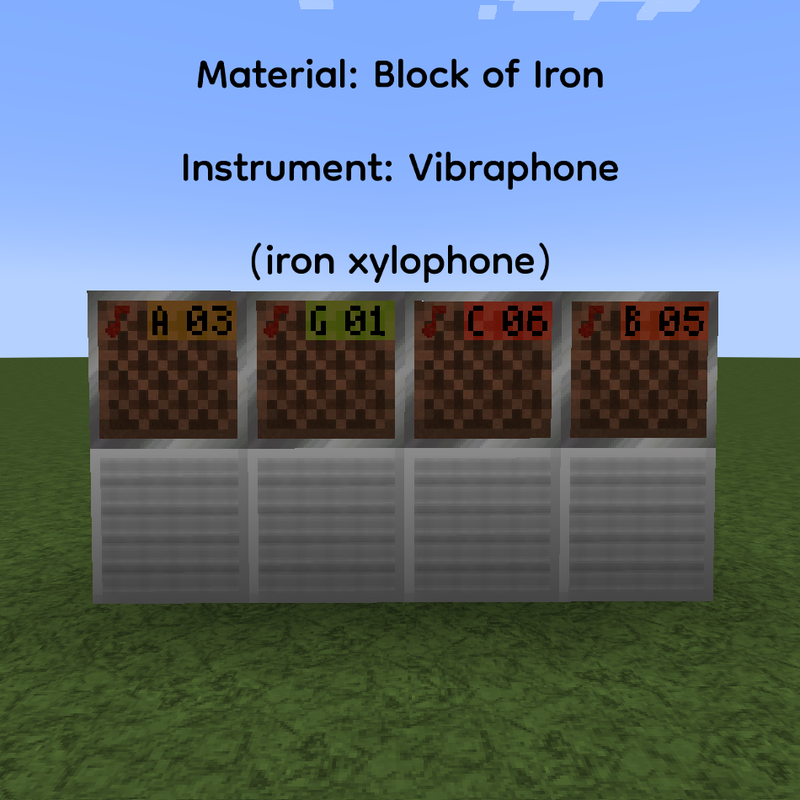
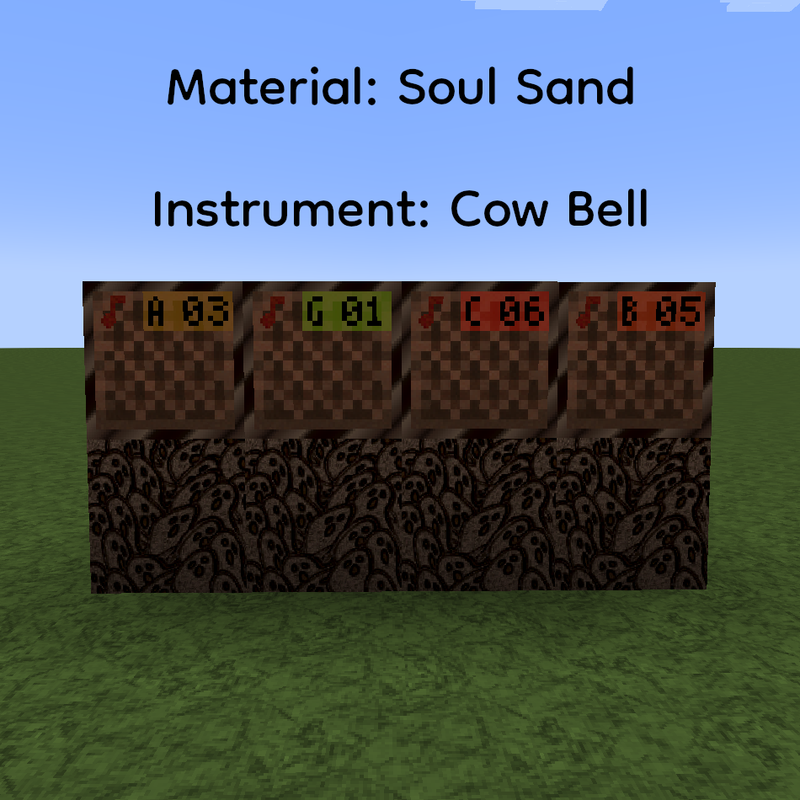
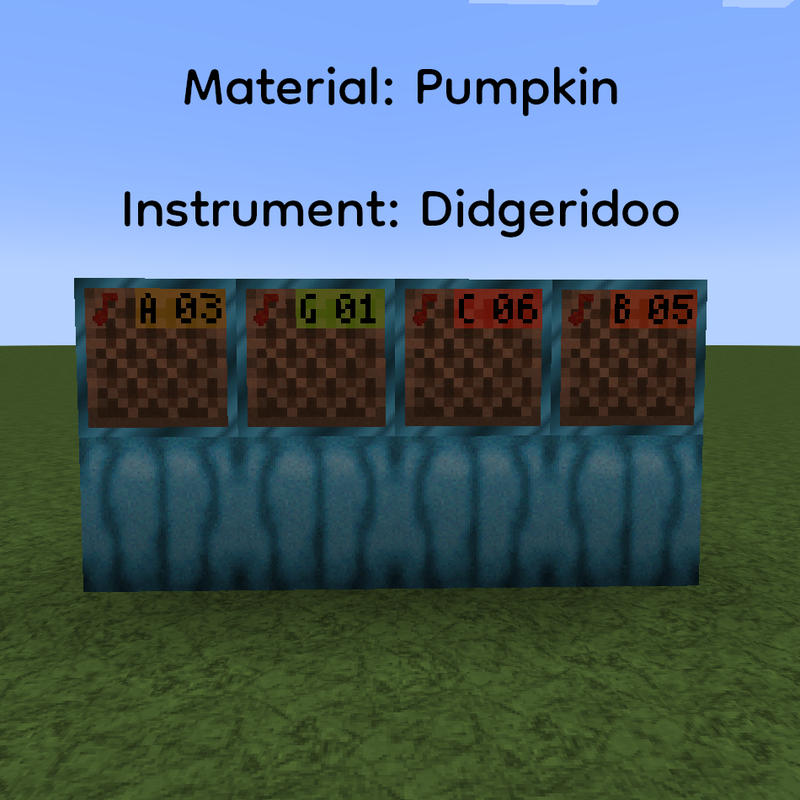
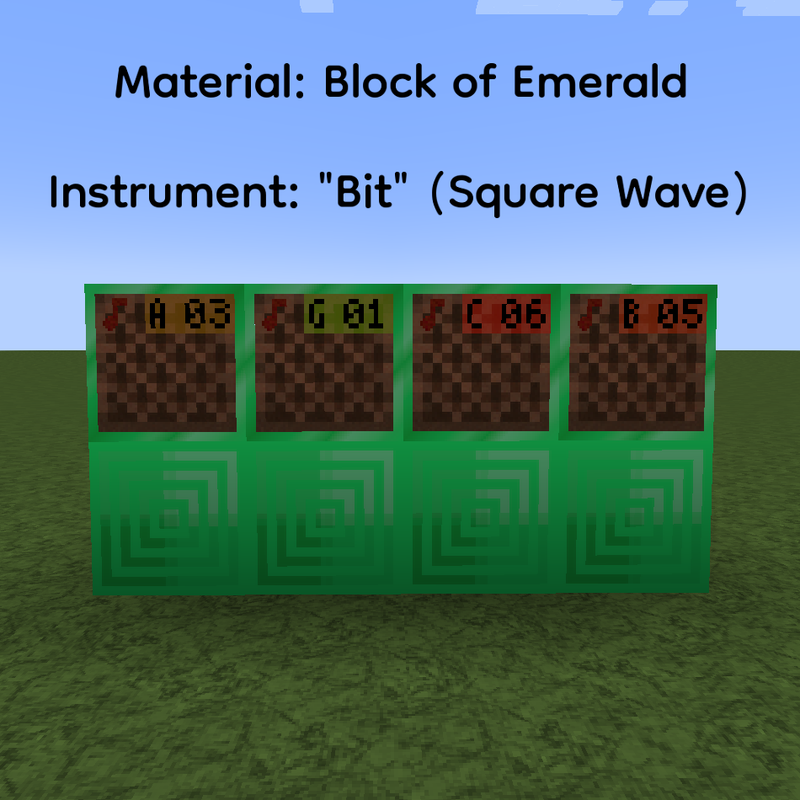
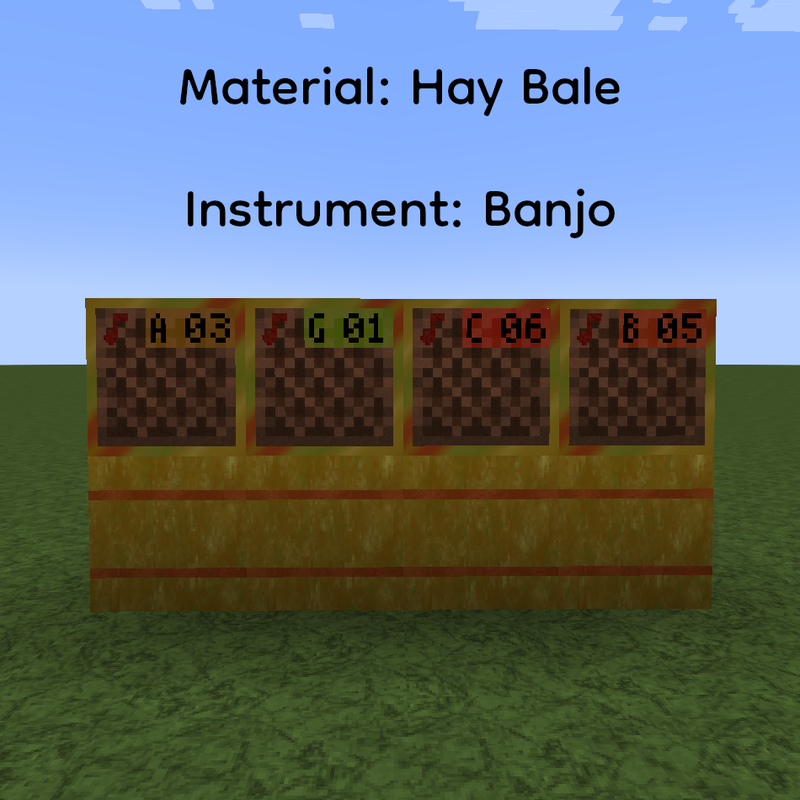
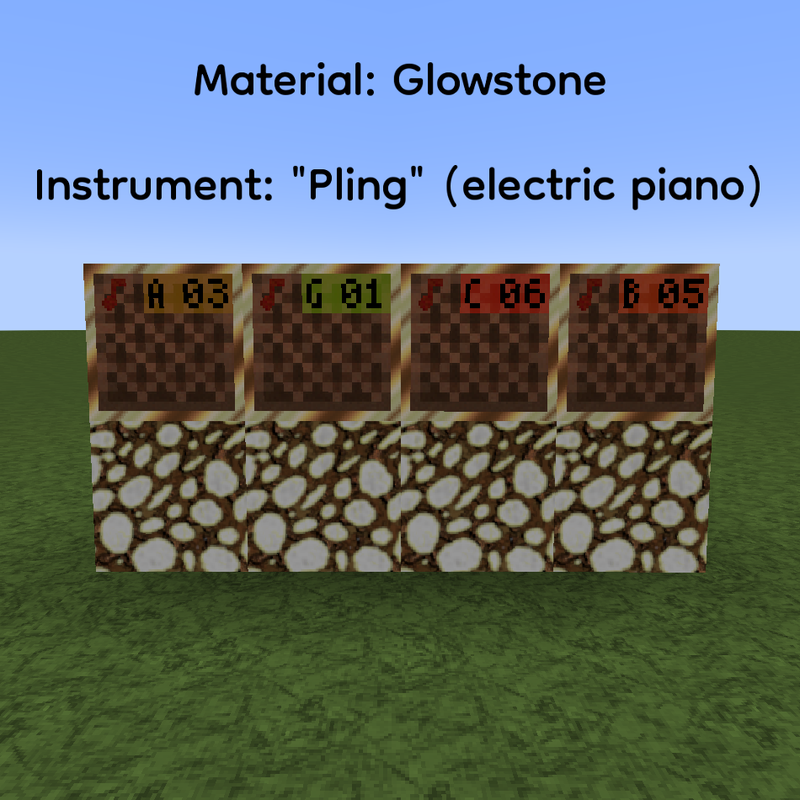
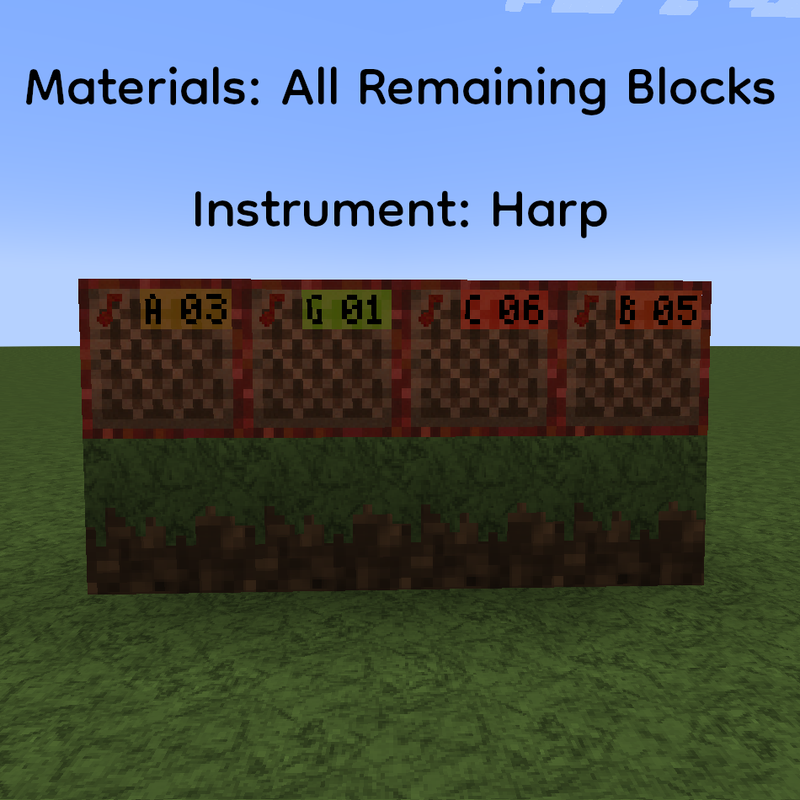
- Note Block Pitch listed on the block and the border changes based on the "instrument" it's producing. See screenshots for reference images below.
- Piston and Sticky Piston Color differences between the piston and sticky piston on the side for additional differentiation.
Status Indicator These textures provide information relating to the status of that block that is the result of player interaction.
- Daylight Detector Power level visible on the side and a visual "progress bar" on the top.
- Heavy and Light Weighted Pressure Plates Power levels listed on top of the plate when utilized.
- Jukebox Adds a texture change for when a music disc is present.
- Redstone Dust for Redstone Wires Power levels visually present.
- Dispenser, Dropper, Observer, and Hopper Directional Arrows included in the texture.
- Lever The base lights up red when powered on.
- Sculk Sensor Color saturation changes when sensor is active, in cooldown mode, and off.
- Sculk Shrieker Highlighted texture change when shrieker "can summon" the Warden.
Added Animation
- Furnace When on, the front flames (not the particles) are animated.
- Jack o' Lantern The light is animated.
- Redstone Torch when on
- Spawner
- Torch and Soul Torch
- Wither Rose
- Amethyst Cluster as mentioned earlier with under "Progress Maxed Out".
3D Textures JSON files in Models folder are from VanillaTweaks and the block textures are my own.
- Stone Cutter
- Sugarcane
- Ladder
- Lantern and Soul Lantern
- Lily Pad texture is also tweaked to include a pink flower on top.
- Vines
- Glow Lichen
- Chain
- All Rails (activator, detector, powered, rail, and rail corner)
Highlighted These blocks has a highlighted border around them for improved visibility.
- Amethyst Budding Block
- Ancient Debris
- Waxed Copper Blocks in inventory only
- Infested Stone Blocks in inventory only
Redone These blocks are completely redone mainly with a color change.
- Pumpkin and Pumpkin Stems There are blue pumpkins in game.
- Target Block Blue lines instead of red and added a Creeper face to the center
Tweaked These block textures are tweaked more than other blocks but not a full recoloration redesign as the redone blocks.
- Barrel Changed the open barrel texture to include a fish in water.
- Cactus Added pink flowers around the sides and top.
- Lily Pad As mentioned earlier, added a pink flower on top.
- ORES Stone and Deepslate Ores have animal paw prints while the Nether Ores utilizes a fossil design.
- Seagrass and Tall Seagrass Added a color change/shift in its animation.
- Iron Bars Utilized VanillaTweaks Iron Bar Fix to address the z fighting texture issue and textured the iron bars with my Iron Block design.
- Carved Pumpkin and Jack o' Lantern Added the carved face on all sides (N,E,S,W) of the pumpkin and changed the bottom texture to match what a bottom of a pumpkin looks like, which doesn't include the stem.
Not Block Related
- Added a Brewing Guide in game when utilizing the Brew Stand
- Removed the blurred pumpkin face texture when wearing a carved pumpkin and replaced with a blurred blue outline around the edges of the screen for improved visibility while maintaining a visual cue that you're wearing a pumpkin
- Updated entity textures, especially villagers
Features
Below are the remaining texture changes that you will see and experience in-game.
Additional FeaturesAdditional Features
Block Folder (All texture sizes are 64x64)
- Enhanced All Chiseled Blocks
- Updated Crying Obsidian and Obsidian
- Enhanced Details in Coral and Dead Coral Blocks
- Retextured Lodestone
- Retextured Prismarine, Prismarine Bricks, and Dark Prismarine
- Heart details to Redstone Lamp
- Added additional folders for re-organization; see folders section below for more information
- Added alt textures; see folders section below for more information
Entity Folder
- Allay
- Axolotls
- Bees
- Beds
- Cats
- Cow & Mooshrooms
- Enderdragon
- Enderman
- Foxes
- Frogs
- Ghasts
- Goat
- Hoglins
- Horses
- Illagers
- Evoker, Evoker Fangs, Illusioner, Pillager, Ravager, Vex, and Vindicator
- Iron Golem
- Llama
- Shulker (plus all 16 colors)
- Piglins
- Pig
- Parrots
- Rabbits
- Skeletons
- Slime and Magma Cube
- Spiders
- Striders
- Turtle
- Villagers
- All biome types and professions have been updated
- Warden
- Wither
- Wolf
- Zombies
- Blaze
- Bat
- Dolphin
- Guardian and Elder Guardian
- Phantom
- Silverfish
- Snow Golem
- Trident
- Wandering Trader
- Witch
Note: All Custom Mob Textures are done by me with the inspiration of various creators on PlanetMinecraft and at 2x Resolution. ➡️ Mob Skins Collections
Environment Folder
- 3D Sun and Moon from Vanilla Tweaks and recolored for this pack
GUI Folder
- Gave the GUI a Dark Cyan-ish Vibe
Item Folder (Texture size at 64x64)
- Animated Items
- Amethyst Shard
- Blaze Powder
- Blaze Rod
- Campfire and Soul Campfire
- Coal
- Diamond
- Dragon's Breath
- Emerald
- End Crystal
- Ender Eye
- Ender Pearl
- Experience Bottle
- Fire Charge
- Firework Rocket
- Glowstone Dust
- Goat Horn
- Ingots (copper, gold, iron, netherite)
- Nuggets (gold and iron)
- Gunpowder
- Honey Bottle
- Lantern and Soul Lantern
- Lapis Lazuli
- Nether Star
- Prismarine Crystal and Shard
- Nether Quartz
- Raw Ores (copper, gold, iron)
- Redstone
- Seagrass
- Slime Ball
- Spectral Arrow
- Sugar
- Tipped Arrow Head
- Trident
- Totem of Undying
- Turtle Egg
- Completely Redone Items
- Dye (all 16)
- Spyglass
- Details on Banner Patterns
- Original from Vanilla Tweaksand then redid the details myself
- Rotten Flesh
- Nether Tools and Armor
- Diamond Tools and Armor
- Iron Tools and Armor
- Recolored Crossbow and Bows
- Enhanced Chainmail Armor
Misc. Folder
- Enhanced Powder Snow Outline
Mob Effect Folder
- Increased resolution and enhanced the colors
Models Folder
- Matched armor to ore texture in pack
- Added alt size options; see folders section below for more information
Painting Folder
- Updated back of painting to match current planks
Particle Folder
- Increased resolution and enhanced colors
Folders
I made two changes in regards to folders; grouping similar textures for organization style, or Additional Folder Organization, and providing alternative textures without impacting base designs, or Alternate Texture Folders.
Additional Folder OrganizationAdditional Folder Organization
This section is important to know for those who want to utilize my pack textures and set up for their own and can't seem to find what they're looking for with the standard (and expected) folder tree setup. To have things consistent across all areas, any block texture placed within its own folder will also have their corresponding model/block/(name).json file in their own folder as well.
The following textures are placed within their own folders:
- bee_nest folder
- front folder
- 0-5.png (for visual honey levels)
- bottom.png
- side.png
- top.png
- front folder
- beehive folder
- front folder
- 0-5.png (for visual honey levels)
- bottom.png
- side.png
- top.png
- front folder
- bookshelf folder
- 0-4.png (stores variation of textures, note: 0.png is the texture visible in your inventory.)
- bricks folder
- bricks.png
- see Alternative Texture Folder section for more information
- cauldron folder
- lava folder
- side_full.png
- top_full.png
- powder_snow folder
- side_full.png
- top_full.png
- water folder
- side_full.png
- top_full.png
- bottom.png
- inner.png
- side.png
- top.png
- lava folder
- comparator folder
- off_subtract.png
- off.png
- on_subtract.png
- on.png
- daylight_detector folder
- inverted_top folder
- 0-15.png (for visual power level)
- side folder
- 0-15.png (for visual power level)
- top folder
- 0-15.png (for visual power level)
- side.png
- top.png
- inverted_top folder
- heavy_weighted_pressure_plate folder
- 0-15.png (for visual power level)
- honeycomb_block folder
- 0-5.png (stores variation of textures, note: 0.png is the texture visible in your inventory.)
- jukebox folder
- side_has_record.png
- side.png
- top_has_record.png
- top.png
- leaves folder
- acacia folder
- 0-3.png (stores variation of textures, note: 0.png is the texture visible in your inventory.)
- azalea folder
- 0-3.png (stores variation of textures, note: 0.png is the texture visible in your inventory.)
- birch folder
- 0-3.png (stores variation of textures, note: 0.png is the texture visible in your inventory.)
- cherry folder
- 0-3.png (stores variation of textures, note: 0.png is the texture visible in your inventory.)
- dark_oak folder
- 0-3.png (stores variation of textures, note: 0.png is the texture visible in your inventory.)
- flowering_azalea folder
- 0-3.png (stores variation of textures, note: 0.png is the texture visible in your inventory.)
- jungle folder
- 0-3.png (stores variation of textures, note: 0.png is the texture visible in your inventory.)
- mangrove folder
- 0-3.png (stores variation of textures, note: 0.png is the texture visible in your inventory.)
- oak folder
- 0-3.png (stores variation of textures, note: 0.png is the texture visible in your inventory.)
- spruce folder
- 0-3.png (stores variation of textures, note: 0.png is the texture visible in your inventory.)
- acacia folder
- light_weighted_pressure_plate folder
- 0-15.png (for visual power level)
- note_block folder
- instrument folder
- note folder
- side.png
- piston folder
- bottom_extended_sticky.png
- bottom_extended.png
- bottom_sticky.png
- bottom.png
- inner.png
- side_sticky.png
- side.png
- top_sticky.png
- top.png
- redstone_dust folder
- 0-15.png (for visual power levels)
- dot.png
- line0.png
- line1.png
- overlay.png
- repeater folder
- (1-4)_on.png (visual delay when powered)
- 1-4.png (visual delay)
- sculk folder
- calibrated folder
- amethyst(_active/_cd).png
- bottom(_active/_cd).png
- input_side(_active/_cd).png
- side(_active/_cd).png
- tendril(_active/_cd).png + .mcmeta files for all 3
- top(_active/cd).png
- catalyst folder
- bottom.png
- side(_bloom).png + _bloom.png.mcmeta
- top(_bloom).png + _bloom.png.mcmeta
- sensor folder
- amethyst(_active/_cd).png
- bottom(_active/_cd).png
- side(_active/_cd).png
- tendril(_active/_cd).png + .mcmeta files for all 3
- top(_active/cd).png
- shrieker folder
- bottom.png
- can_summon_(bottom/inner_top/side/top) + _inner_top.png.mcmeta
- inner_top.png + mcmeta file
- side.png
- top.png
- sculk_vein.png
- sculk_vein.png.mcmeta (provides animation information)
- sculk.png
- sculk.png.mcmeta (provides animation information)
- calibrated folder
- terracotta folder
- dyed folder (see Alternative Texture Folder for more information)
- all colors here
- glazed folder
- all colors here
- terracotta.png
- dyed folder (see Alternative Texture Folder for more information)
Alternative Texture Folders
These folders hold alternative textures that you can utilize instead of the ones already provided. These folders are not rendered in-game so there will be no clash in textures.
If you want to utilize them, you will need to unzip this resource pack and replace the original textures with the textures in the alt folder.
You'll find two alt folders available with the first listed alt folder storing a copy of the original textures as a back-up, in the event you accidentally delete the original without saving, and the second listed alt folder storing the actual alternative textures.
Note: This feature is only available for v3.0.2 and up of my resource pack.
BRICKS
The alternative texture is located in the alt2 folder and provides the blue brick block variation. Recently I reverted my brick color texture back to the original color, away from the blue brick that first was released with this pack initially. This is because, as much as blue is the theme of this pack, it did create some visual issues when it came to build designs. I also reverted the brick item and the flower pot back to the original vanilla color, however I did NOT provide the blue color alternative texture for those items.
TERRACOTTA
Within the terracotta folder, within the dyed folder, no alt1 folder is provided. I just forgot and had already zipped the pack for 1.19 through 1.20.1 and just did not want to go back for version v3.0.2. Any changes to that will be listed here. There is a folder named alt_dungeons_parity. When I first released this pack, I utilized the Dungeons Parity terracotta textures from VanillaTweaks and added my own spin on them Similarly to the bricks, I began running into building design issues that deemed this texture, not so great, however I still enjoyed the details of it and wanted it to still be available.
ARMOR IN MODELS FOLDER
Under textures/models/armor, there are the entity maps of all the armor variations. When this pack was initially released, with all the increased resolution textures, these armor textures were set at 32x, instead of the standard 16x resolution. I recently ran into rendering issues on a server where they had their own armor textures set to the 16x resolution and that clashed with my design. However, since my pack is about the increased resolution of textures, I didn't want to lose the 32x armor textures. Within the armor folder, there are two alt folders titled alt_16x and alt_32x. The 16x folder, as mentioned above, is the copy of the standard pack texture, in the event you lose the original. The alt_32x folder holds my pack's original 32x resolution design for the armor and both sets of textures have been updated so there's some element of similarity between the two regardless of the resolution.
Screenshots
Note Block Border Reference Images



Credit
With all the work put into this pack, I want to take the time to shout out other creators who inspired me, who's textures I utilized and expanded, and who's json files educated me. If it weren't for these creators sharing their hard work with the rest of us, this pack would look differently.
👏 Redstone Tweaks by RexxStone
👏 XeKr Redstone Display by xekr
Thank You
Thank you so much for downloading my pack! I hope you enjoy the textures I made and put together.
If there are any issues with the textures that you experience, please let me know as soon as possible either in the comments or submit an issue report. You can also reach me at my PlanetMinecraft profile.
If you use my pack in any online posts, video content, and/or live streams, please copy and paste the following statement in your content's description box.
Resource Pack: Blu-RAE by Puppy RaeLuna


- Edition: Minecraft Java
- File type: .zip (resource pack)
- Minecraft versions listed: 1.20, 1.20.1
- How to install: Download the .zip resource pack — do not unzip it. → Put it in .minecraft/resourcepacks. → Enable it in Options → Resource Packs.
- Where to get it: Opens on Modrinth — not every file is mirrored on our own servers.
Install steps are the general flow for this file type — How to install Minecraft Java resource packs walks through it step by step.
- Downloads as BluRae v3.1.0 for MC 1.20-1.20.1.zip
- Download size: 34.0 MB
- Download link checked 31 Aug 2026 — working
These come from our own check of the pack file, not from the source page.