
ResourcepacksJava
CrystalcraftPBR
I don't know my version or loader
Open the Minecraft launcher and look at the profile you play on — it names both, like fabric-loader-1.21.4. The version also shows in the bottom-right corner of the game's main menu.
No loader in the profile name? Then it's plain Minecraft, and these mods won't run — you need Fabric or NeoForge installed first.


CrystalcraftPBR
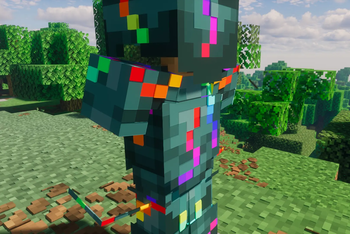
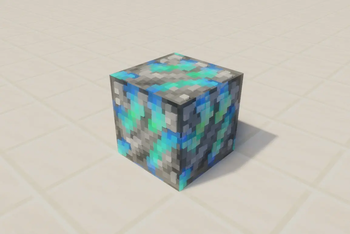
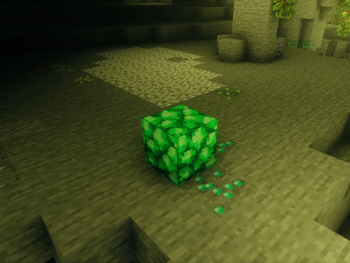
This texture pack adds normal and specular maps according to the LabPBR 1.3 standard to the textures of the Crystalcraft Unlimited mod. This means that the textures have depth and reflections. If you are looking for emissive textures like glowing ores, feel free to try this other resource pack of mine.
Completeness
Normal maps- Blocks: 100%
- Entities: 100%
- Items: 100%
- Armor: 100%
- Blocks: 5%
- Entities: 100%
- Items: 3%
- Armor: 20%
How to use
- Download this texture pack and put it in the “resourcepacks” folder.
- Install Iris (recommended) or Optifine
- Download a shader, that supports the LabPBR 1.3 standard (examples below) and put it in the “shaderpacks” folder of your Minecraft instance.
- Activate all recommended PBR options in the shader settings.
- Advanced Materials > Parallax > Parallax Occlusion Mapping: ON
- Advanced Materials > Parallax > Self Shadows: ON
- Resource Pack Support > Material Ambient Occlusion: On
- Resource Pack Support > Specular Reflections > Specular Reflections: On
- Resource Pack Support > Specular Reflections > Screen-Space Reflections: On
- Resource Pack Support > Emissive: Hardcoded + Lab Emission
- Resource Pack Support > Sub-Surface Scattering > Mode: Hardcoded + LabSSS
- Resource Pack Support > Parallax Occlusion Mapping / POM > Parallax Occlusion Mapping: On
- PBR > LabPBR Maps: On
- PBR > Screen Space Reflections: Accurate Reflections
- PBR > PBR for Translucent Blocks: On
- PBR > Hardcoded Metals: On
- PBR > POM: On
- PBR > Advanced Settings > Pixel Pack: On
- Material > Advanced Materials: ON
- RP Support: labPBR (RP Required)
- Advanced Options > Material & Reflections > Material Format*: labPBR 1.3
- Lighting > Indirect Light > Emission Mode: Hardcoded + labPBR
- Terrain > Vertex Attribute Fix: ON
- Terrain > Parallax Occlusion Mapping > Enabled: ON
- Terrain > Parallax Occlusion Mapping > Slope Normal Calculation: On
- Terrain > Reflections > Resourcepack Reflections: ON
- Terrain > Reflections > Reflection Capture: On
- Surface Settings > Material Support: On
- Surface Settings > Material Normal Config > Parallax Occlusion Mapping: On
- Terrain > POM > POM: Steep
- Terrain > POM > Layers: 128
- Terrain > POM > Shadowing: ON
- Materials > Normal Mapping: ON
- Materials > Specular Mapping: ON
- Materials > Parallax Occlusion Mapping: ON
- Materials > Resource Pack Settings > Parallax Samples: 60
- Materials > Resource Pack Settings > POM Self-Shadowing: ON
- Materials > Normal Map: Lab-PBR
- Materials > Specular Map: Lab-PBR
- Materials > Emission: Lab-PBR
- Materials > Porosity: Lab-PBR
- Materials > SSS: Lab-PBR
- Materials > Occlusion: Lab-PBR
- Materials > Displacement > Type: POM
- Materials > Displacement > Parallax Options > POM Samples: 48
- Resourcepack PBR > RPPBR > Resourcepack PBR: On
- Resourcepack PBR > RPPBR > Parallax Occlusion Mapping*: On
- Resourcepack PBR > RPPBR > Self Shadows*: On
- PBR > PBR mode: Lab PBR 1.3
- PBR > Slope normals: On
- PBR > Parallax occlusion settings > Parallax occlusion: On
Some parts of some textures that are based on vanilla textures are based of the SPBR resource pack.
Quick facts
- Edition: Minecraft Java
- File type: .zip (resource pack)
- Minecraft versions listed: 1.16.5, 1.18.2, 1.19.2
- How to install: Download the .zip resource pack — do not unzip it. → Put it in .minecraft/resourcepacks. → Enable it in Options → Resource Packs.
- Where to get it: Opens on Modrinth — not every file is mirrored on our own servers.
Install steps are the general flow for this file type — How to install Minecraft Java resource packs walks through it step by step.
Verified by MCModsHub
- Downloads as CrystalcraftPBR_1.0.zip
- Download size: 7.6 MB
- Download link checked 31 Aug 2026 — working
These come from our own check of the pack file, not from the source page.