


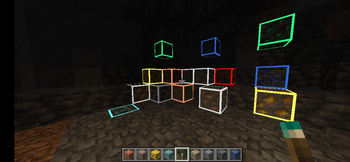
conversation
A: Hey, have you tried the resource pack called Glow Ore Vanilla?
B: No, what does it do?
A: It makes ores glow with a bright outline. You can see coal, iron, even diamonds in caves more easily.
B: Sounds useful. Does it need mods or OptiFine?
A: Not at all. It works in vanilla Minecraft. Just drop it into the resourcepacks folder and enable it.
B: Nice. So it doesn’t change the whole game, only the ore textures?
A: Exactly. It keeps the vanilla look, but the ores are highlighted. Perfect if you don’t want shaders.
B: That’s great, because my laptop lags with shaders.
A: Same here. This pack is light, no FPS drop.
B: What versions does it work on?
A: I tested on 1.20, and it’s fine. People said it also runs on 1.18 and 1.19 with the right pack_format.
B: Cool. If I use another pack that changes ores, will it still work?
A: Yes, just put Glow Ore Vanilla on top of the list.
B: Got it. Thanks, I’ll try it tonight.
A: No problem. Enjoy glowing diamonds!

- Edition: Minecraft Java
- File type: .zip (resource pack)
- Minecraft version listed: 1.21
- How to install: Download the .zip resource pack — do not unzip it. → Put it in .minecraft/resourcepacks. → Enable it in Options → Resource Packs.
- Where to get it: Opens on Modrinth — not every file is mirrored on our own servers.
Install steps are the general flow for this file type — see the MC Java Mods guides for the full walkthrough.
- Downloads as glowing_ore_vanilla_1.21.zip
- Download size: 22 KB
- Download link checked 31 Aug 2026 — working
These come from our own check of the pack file, not from the source page.