
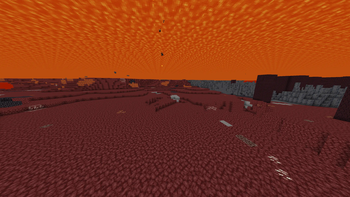
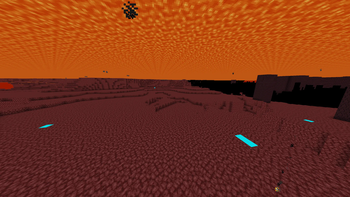
Easily mine for the best material in the game!
 Before using the pack, you can see many blocks that could be distracting or irrelevant
 After using the pack, you can see many blocks that could be distracting or irrelevant have been changed to netherrack, and ancient debris is now an unmistakable blue
All biomes where ancient debris is hard to find (e.g., Soul Sand Valley, Basalt Delta) have been changed to black to notify you to stay clear of those biomes.
Quick facts
- Edition: Minecraft Java
- File type: .zip (resource pack)
- Minecraft versions listed: 1.16, 1.16.1, 1.16.2
- How to install: Download the .zip resource pack — do not unzip it. → Put it in .minecraft/resourcepacks. → Enable it in Options → Resource Packs.
- Where to get it: Opens on Modrinth — not every file is mirrored on our own servers.
Install steps are the general flow for this file type — How to install Minecraft Java resource packs walks through it step by step.
Verified by MCModsHub
- Downloads as Netherite Mining Plus.zip
- Download size: 88 KB
- Download link checked 22 Sept 2026 — working
These come from our own check of the pack file, not from the source page.