
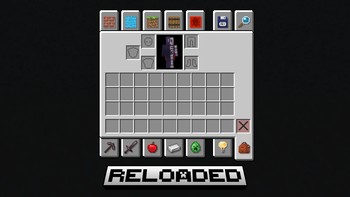
Creative Menu: Reloaded
Transforms the creative menu tab icons from a mixture of 3D renders and 2D sprites into a consistent set of purely 2D sprite designs. Each icon features an elegant drop shadow for visual emphasis and improved readability. This pack utilizes custom shader modifications to seamlessly replace default models by targeting a transparent red pixel in the top left corner of each sprite.
Features
- Converted all tab icons to consistent 2D sprite designs
- Replaced several boring icons with brand new sprites
- Added stylish drop shadows to enhance visual appeal
Installation
- Download the resource pack
- Place the .zip file directly in your resource packs folder
- Activate in-game and enjoy!
This work is licensed under a Creative Commons Attribution-NonCommercial-ShareAlike 4.0 International
© 2025 7eventy7 | Some Rights Reserved | CC BY-NC-SA 4.0
Quick facts
- Edition: Minecraft Java
- File type: .zip (resource pack)
- Minecraft version listed: 1.21.5
- How to install: Download the .zip resource pack — do not unzip it. → Put it in .minecraft/resourcepacks. → Enable it in Options → Resource Packs.
- Where to get it: Opens on Modrinth — not every file is mirrored on our own servers.
Install steps are the general flow for this file type — How to install Minecraft Java resource packs walks through it step by step.
Verified by MCModsHub
- Downloads as §7§l§nCreative Menu Reloaded§8§k.zip
- Download size: 101 KB
- Download link checked 31 Aug 2026 — working
These come from our own check of the pack file, not from the source page.