
Montserrat&GlowSans Font Pack
Montserrat & GlowSans Font Pack Introduction Montserrat & GlowSans Font Pack is a resource pack that focuses solely on modifying the fonts in Minecraft…
⬇ Download on Modrinth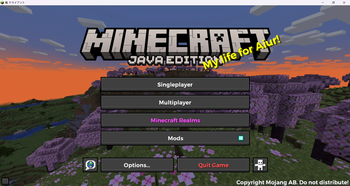
Montserrat & GlowSans Font Pack
Introduction
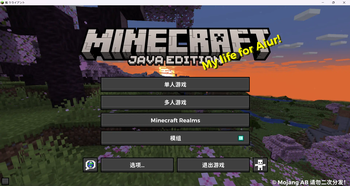
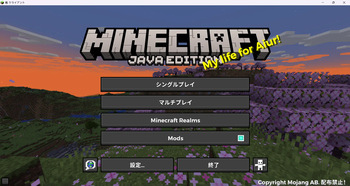
Montserrat & GlowSans Font Pack is a resource pack that focuses solely on modifying the fonts in Minecraft. By replacing the game's default fonts, this pack brings a modern and clean look to your game's interface, enhancing the readability and aesthetic of menus, dialogues, and other UI elements.
Features
- Elegant Montserrat Font: Montserrat is a popular sans-serif font known for its clarity and simplicity. It brings a stylish, modern feel to the Minecraft interface, perfect for players who appreciate minimalist design.
- Clean GlowSans CJK Font: GlowSans is a font specifically designed for CJK (Chinese, Japanese, Korean) characters, known for its clean and legible design. This font pack is optimized to improve the display of CJK text in Minecraft, ensuring clarity and beauty for non-Latin characters.
- Font-Only Modification: This resource pack only modifies the fonts in Minecraft, leaving all other visual elements and sounds untouched.
- Wide Compatibility: This resource pack is compatible with Minecraft versions 1.14 to 1.21. It requires no additional configuration—simply install and enjoy.
Installation Guide
- Download the
Montserrat & GlowSans Font Pack.zipfile. - Open your Minecraft game directory and locate the
resourcepacksfolder. - Drag and drop the downloaded
.zipfile into theresourcepacksfolder. - Launch Minecraft, go to the settings menu, and select the resource packs option.
- Enable the
Montserrat & GlowSans Font Packfrom the list of available packs. - Confirm and apply the changes, and you're all set to enjoy the new fonts!
Compatibility
This resource pack has been tested and is compatible with Minecraft versions 1.14 to 1.21.
Enjoy a unique Minecraft experience with improved fonts!
- Edition: Minecraft Java
- File type: .zip (resource pack)
- Minecraft versions listed: 1.14, 1.14.1, 1.14.2
- How to install: Download the .zip resource pack — do not unzip it. → Put it in .minecraft/resourcepacks. → Enable it in Options → Resource Packs.
- Where to get it: Opens on Modrinth — not every file is mirrored on our own servers.
Install steps are the general flow for this file type — How to install Minecraft Java resource packs walks through it step by step.
- Downloads as 1.1.zip
- Download size: 6.6 MB
- Download link checked 22 Sept 2026 — working
These come from our own check of the pack file, not from the source page.