
Dark Mode Vanilla
Dark Mode Vanilla is a clean, fully dark‑themed vanilla GUI resource pack that makes every menu and inventory easier on the eyes
⬇ Download on Modrinth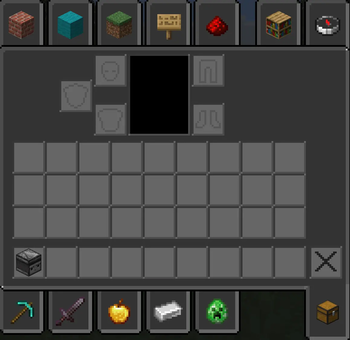

Dark Mode Vanilla
transforms Minecraft’s user interface into a cohesive, low‑glare dark theme while preserving the original vanilla look and feel. Every GUI element — menus, inventories, tooltips, HUD elements, and creative‑mode tab backgrounds — has been retinted and redesigned for improved contrast and readability in low‑light play sessions. The pack keeps block and item textures unchanged so gameplay remains familiar; only interface elements are adjusted to deliver a modern, comfortable dark‑mode experience.
Features
- Full dark GUI: All menus, inventories, and HUD elements are converted to a consistent dark palette.
- Vanilla faithful: UI shapes, spacing, and icons remain true to vanilla Minecraft for minimal disruption.
- Improved readability: Text contrast and icon clarity optimized for night play and long sessions.
- Creative tab backgrounds: Darkened tab panels and item‑slot surfaces for a unified look.
- Light accents: Subtle cool blue and gray highlights preserve visual hierarchy without bright colors.
- Low performance impact: Only GUI textures are modified; no heavy assets or shaders required.
- Version support: Compatible with Minecraft Java Edition 1.20 through 1.21.8 and later.
- Edition: Minecraft Java
- File type: .zip (resource pack)
- Minecraft versions listed: 1.20, 1.20.1, 1.20.2
- How to install: Download the .zip resource pack — do not unzip it. → Put it in .minecraft/resourcepacks. → Enable it in Options → Resource Packs.
- Where to get it: Opens on Modrinth — not every file is mirrored on our own servers.
Install steps are the general flow for this file type — How to install Minecraft Java resource packs walks through it step by step.
- Downloads as Dark_v2.zip
- Download size: 255 KB
- Download link checked 1 Sept 2026 — working
These come from our own check of the pack file, not from the source page.