
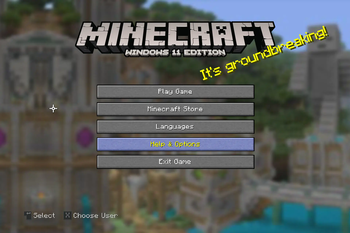
All Logos and/or branding belongs to Microsoft (Windows), Canonical (Ubuntu), RedHat (Fedora), and Judd Vinet (Arch), please don't sue me.
Info
Have you ever heard of Minecraft: Windows 10 Edition... no? ok. This resource pack replaces the standard Java Edition Title to Windows 11 Edition Title for Legacy4J and eventually Legacy Tweaks, use this resource pack on Windows 11 (NOT Windows 10... maybe), or even use this on Kubuntu, Fedora KDE Desktop, or Arch Linux that looks like Windows 11.

Requirements
This requires Legacy4J or Legacy Tweaks(Not Finished) for this resource pack.
You can use Modpacks Like
- Re-Console by Nostalgica Reverie
- Project4J by Cixon
- Legacy Return by Atreyu1227
- William's Console: Revisited by PeacefulWilliam and VoliaFlower
- Edition: Minecraft Java
- File type: .zip (resource pack)
- Minecraft versions listed: 1.20.1, 1.20.4, 1.21
- How to install: Download the .zip resource pack — do not unzip it. → Put it in .minecraft/resourcepacks. → Enable it in Options → Resource Packs.
- Where to get it: Opens on Modrinth — not every file is mirrored on our own servers.
Install steps are the general flow for this file type — How to install Minecraft Java resource packs walks through it step by step.
- Downloads as Win11Title.zip
- Download size: 85 KB
- Download link checked 22 Sept 2026 — working
These come from our own check of the pack file, not from the source page.