

Minecraft Resource Pack: Superior Pack 16x
Step into a world of crisp visuals and charming details with Superior Pack 16x. Designed for the discerning builder and the adventurous explorer alike, this resource pack elevates your Minecraft experience to new heights of clarity and style.
Features:
- 16x Resolution: Each block and item is meticulously crafted at a 16x resolution, offering a perfect balance between performance and aesthetic detail.
- Custom GUI: A sleek and modern interface that's easy on the eyes. The GUI is intuitive, ensuring that your crafting, inventory management, and exploration are seamless.
- Revamped Blocks: From the rustic charm of oak planks to the shimmering obsidian, every block is reimagined to bring a fresh look to your world without straying too far from the classic Minecraft feel.
- Revamped Main Menu: Step into a new realm the moment you start the game with SuperiorPack’s main menu. It features a modern design that’s clean and accessible, with quick links to all your favorite game modes and settings.
- Vibrant Textures: Colors pop and textures come to life, whether you're mining deep underground or building your fortress in the sky.
- Optimized for Performance: Despite the enhanced visuals, Pixel Precision 16x is optimized for smooth performance, ensuring that gameplay remains fluid and responsive.
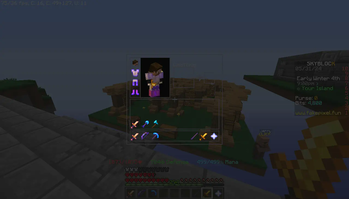
- Mini Swords: Our mini swords are a game-changer for combat enthusiasts. These elegantly designed weapons provide a clear view during battle without losing the essence of Minecraft’s iconic tools. Each sword is a work of art, boasting vibrant textures and a unique style that makes fighting more enjoyable
Transform your Minecraft world with SuperiorPack 16x and experience the game like never before. It’s not just a resource pack; it’s an upgrade to your entire Minecraft journey!
Quick facts
- Edition: Minecraft Java
- File type: .zip (resource pack)
- Minecraft versions listed: 1.8, 1.8.1, 1.8.2
- How to install: Download the .zip resource pack — do not unzip it. → Put it in .minecraft/resourcepacks. → Enable it in Options → Resource Packs.
- Where to get it: Opens on Modrinth — not every file is mirrored on our own servers.
Install steps are the general flow for this file type — How to install Minecraft Java resource packs walks through it step by step.
Verified by MCModsHub
- Downloads as SuperiorPack v4.0.zip
- Download size: 43.7 MB
- Download link checked 1 Sept 2026 — working
These come from our own check of the pack file, not from the source page.