Glassy Tools Resource Pack
Version: 1.0
Minecraft Version: 1.20+
Resolution: 16x16
Overview
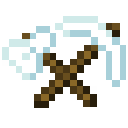
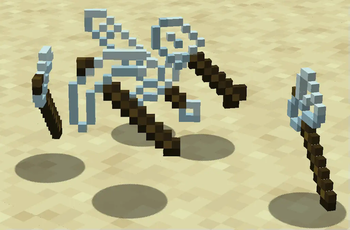
Glassy Tools is a minimalist resource pack that transforms your Netherite tools and sword with a sleek, transparent glass texture. Bring a modern and elegant aesthetic to your Minecraft experience as you wield shimmering, glass-like tools that stand out in any inventory or hotbar.
Features
- Enhanced Visuals: Adds a unique glass texture to all Netherite tools and sword, creating a translucent look without affecting durability or functionality.
- Immersive and Unique: Perfect for players looking to add a subtle, stylish twist to their high-level gear without overwhelming Minecraft’s classic style.
Included Tools
- Netherite Sword
- Netherite Pickaxe
- Netherite Axe
- Netherite Shovel
- Netherite Hoe
Compatibility
This pack is compatible with Minecraft 1.20+ and works seamlessly with other packs, as it only modifies the Netherite tools’ textures.
Installation
- Download the Glassy Tools .zip file.
- Open Minecraft and navigate to
Options > Resource Packs. - Select Open Pack Folder and place the .zip file in the folder.
- Back in Minecraft, enable the Glassy Tools pack, and enjoy!
Quick facts
- Edition: Minecraft Java
- File type: .zip (resource pack)
- Minecraft versions listed: 1.20, 1.20.1, 1.20.2
- How to install: Download the .zip resource pack — do not unzip it. → Put it in .minecraft/resourcepacks. → Enable it in Options → Resource Packs.
- Where to get it: Opens on Modrinth — not every file is mirrored on our own servers.
Install steps are the general flow for this file type — How to install Minecraft Java resource packs walks through it step by step.
Verified by MCModsHub
- Downloads as §fGlass Tools §fv0.3.6.zip
- Download size: 18 KB
- Download link checked 4 Sept 2026 — working
These come from our own check of the pack file, not from the source page.