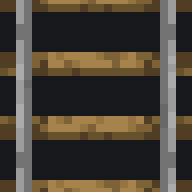
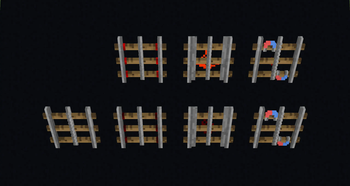
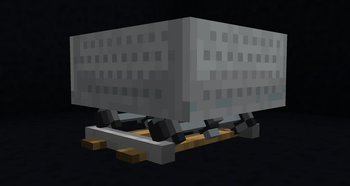
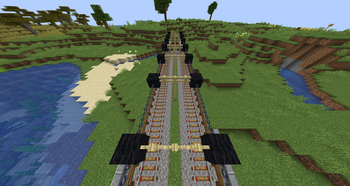

Minecart track in vanilla minecraft has a gauge of 500mm, which is far narrower than almost all railways in the real world. What I hope to achieve with this project is to make building a railway in minecraft not only fun, but somewhat more realistic as well. I chose 1000mm (meter) gauge because it is reasonably the narrowest mainline railway gauge you can find in the world (ignoring Colombia, which uses 914mm gauge), and it is not so wide as to be unreasonable for vanilla Minecraft.

Slopes with vanilla minecraft rails are unreasonably steep, so to compensate for this somewhat, slope sections are now rack sections, and the minecart models included have rack wheels on their axles. I unfortunately failed to come up with a way to make the curves more reasonable.

- The only type of minecart with animations working is the default one, as I have been unable to come up with a way to get the others working. I presume this is a bug with EMF.
- There is z-fighting when rails are placed directly next to a block or another rail
- I intended rails to be given more space
- This pack is not designed to be used in dense redstone contraptions or item pickup systems
- This will likely never be changed

Please note the larger minecart models included in this pack require either OptiFine or EMF to render properly. If you wish to use this pack in vanilla, navigate to the 'textures' folder and delete 'minecart.png'. The minecarts will then be unreasonably small, but they will at least render properly.

Despite Meter Gauge's larger minecart models, it can still be used with Linkart, as long as you use version 5.4.0 or newer. Once you have installed Linkart, to ensure the minecarts don't merge together, navigate to your .minecraft folder (in %appdata%), open the 'config' folder, and open 'linkart' with any text editor, such as notepad. Change 'distance' to 1.5 or higher, depending on how far apart you want your minecarts when they're connected. Once you have done this, restart Minecraft and you're good to go!
- Edition: Minecraft Java
- File type: .zip (resource pack)
- Minecraft versions listed: 24w38a, 24w39a, 24w40a
- How to install: Download the .zip resource pack — do not unzip it. → Put it in .minecraft/resourcepacks. → Enable it in Options → Resource Packs.
- Where to get it: Opens on Modrinth — not every file is mirrored on our own servers.
Install steps are the general flow for this file type — How to install Minecraft Java resource packs walks through it step by step.
- Downloads as §5§lMeter§8§lGauge§f 1.0.8§0.zip
- Download size: 64 KB
- Download link checked 5 Sept 2026 — working
These come from our own check of the pack file, not from the source page.