


Description
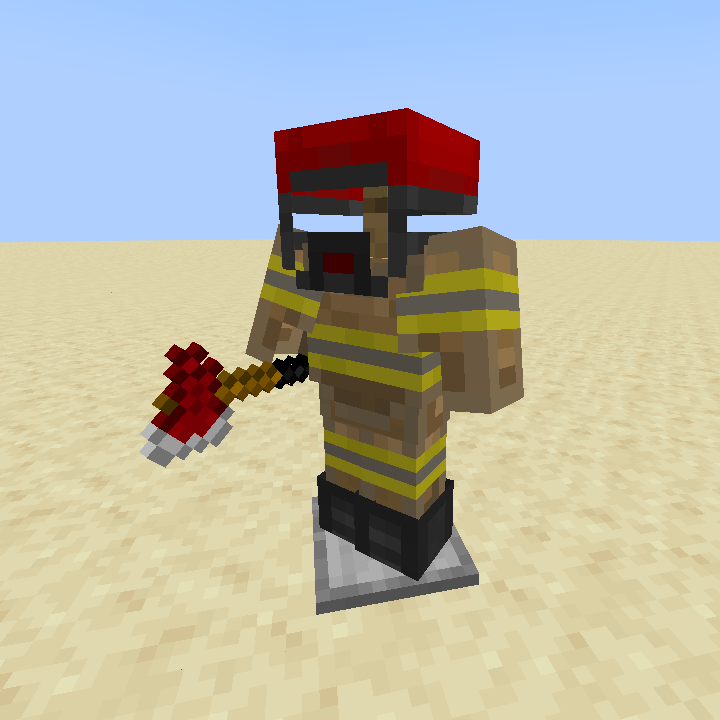
This pack replaces the textures of the armor and axes with the texture of firefighter kit. This can set the situation on the servers, help in roleplay with the players. And it's also fun :)
| Item (Diamond and Netherite) | Required name |
|---|---|
| Axe | Firefighter Axe |
| Axe | Firefighter Hammer |
| Shovel | Firefighter Shovel |
| Helmet | Firefighter Helmet |
| Chestplate | Firefighter Jacket Gloved |
| Chestplate | Firefighter Jacket |
| Leggings | Firefighter Pants |
| Boots | Firefighter Boots |
Installing
The resource pack must be placed in the resourcepacks folder in the .minecraft directory
Default:
- Windows: C:\Users\%USERNAME%\AppData\Roaming\.minecraft\resourcepacks\
- Linux: ~/.minecraft/resourcepacks
Next, in Minecraft, go to [Settings] -> [Resource Packs] -> Select the desired pack -> [Done]
Requirements
- Minecraft version above 1.14
- Installed OptiFine (If you using Forge)
- Installed CIT Resewn (If you using Fabric)
Feedback
You can contact us via email
Finance/referal support


TGjiLho2eUMRAMPf6PUZs16EF2cvphnv8d

1dvL4mQf7cMmXhLc3A2tiyymVDF19TJnV
or USDC-Polygon
0x390a54d13f62d62b4ee366aa23d4b0e0244c496f
My (our) projects




Quick facts
- Edition: Minecraft Java
- File type: .zip (resource pack)
- Minecraft versions listed: 1.14, 1.14.1, 1.14.2
- How to install: Download the .zip resource pack — do not unzip it. → Put it in .minecraft/resourcepacks. → Enable it in Options → Resource Packs.
- Where to get it: Opens on Modrinth — not every file is mirrored on our own servers.
Install steps are the general flow for this file type — How to install Minecraft Java resource packs walks through it step by step.
Verified by MCModsHub
- Downloads as firefighter_1.1.zip
- Download size: 13 KB
- Download link checked 5 Sept 2026 — working
These come from our own check of the pack file, not from the source page.