
Paladium Vanilla 16x
Paladium Vanilla is a texture pack that integrates the 16x textures from the Paladium server, a modded PvP Faction server. It allows players to immerse…
I don't know my version or loader
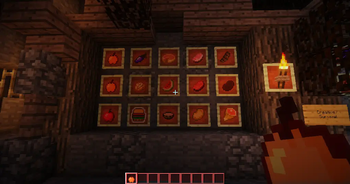
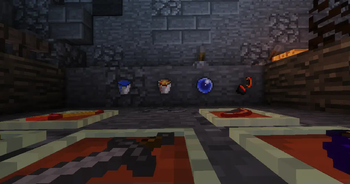
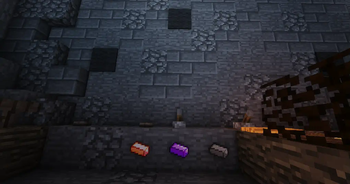
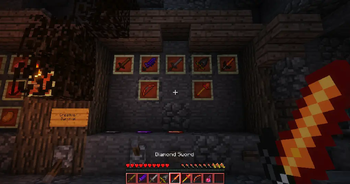
Paladium Pack x16
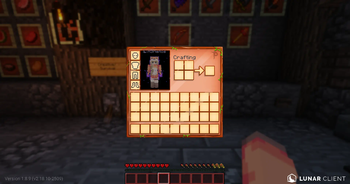
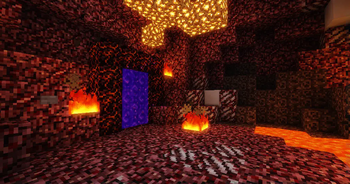
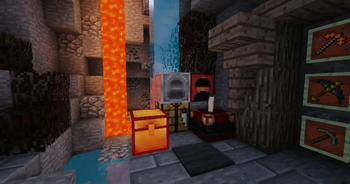
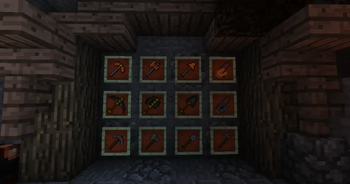
Bienvenue sur le Paladium Pack x16, un resource pack inspiré et adapté du célèbre serveur Paladium pour Minecraft 1.8.9. Ce pack propose des textures fidèles à l’univers Paladium, optimisées en x16 pour les passionées tout en gardant l’esthétique originale.
Présentation
- Textures issue du serveur Paladium (minerais, outils, armures, items…)
- Optimisé pour Minecraft 1.8.9
- Supporte MCPatcher/OptiFine pour les textures personnalisées (CIT)
- Des particules, et des sons adaptés
Fonctionnalités principales
- Textures customisées pour tous les minerais Paladium, Findium, Titane, etc.
- Armures et outils
- Interface utilisateur (GUI) revisitée
- Sons personnalisés
Renommages spéciaux (CIT/MCPatcher)
Grâce à MCPatcher ou OptiFine, tu peux obtenir des textures spéciales en renommant tes items dans l’enclume. Voici des renommages disponibles dans ce pack :
| Base Item | Name to give in anvil | Special texture applied |
|---|---|---|
| Diamond Helmet | Endium Helmet | Casque Endium |
| Diamond Chestplate | Endium Chestplate | Plastron Endium |
| Diamond Leggings | Endium Leggings | Jambières Endium |
| Diamond Boots | Endium Boots | Bottes Endium |
| Diamond Helmet | Paladium Green Helmet | Casque Paladium Vert |
| Diamond Chestplate | Paladium Green Chestplate | Plastron Paladium Vert |
| Diamond Leggings | Paladium Green Leggings | Jambières Paladium Vert |
| Diamond Boots | Paladium Green Boots | Bottes Paladium Vert |
| Diamond Helmet | Paladium3 Helmet | Casque Paladium3 |
| Diamond Chestplate | Paladium3 Chestplate | Plastron Paladium3 |
| Diamond Leggings | Paladium3 Leggings | Jambières Paladium3 |
| Diamond Boots | Paladium3 Boots | Bottes Paladium3 |
| Diamond Helmet | Paladium2 Helmet | Casque Paladium2 |
| Diamond Chestplate | Paladium2 Chestplate | Plastron Paladium2 |
| Diamond Leggings | Paladium2 Leggings | Jambières Paladium2 |
| Diamond Boots | Paladium2 Boots | Bottes Paladium2 |
| Diamond Helmet | Paladium1 Helmet | Casque Paladium1 |
| Diamond Chestplate | Paladium1 Chestplate | Plastron Paladium1 |
| Diamond Leggings | Paladium1 Leggings | Jambières Paladium1 |
| Diamond Boots | Paladium1 Boots | Bottes Paladium1 |
| Chainmail Helmet | Hood Helmet | Capuche |
| Chainmail Helmet | Scuba Helmet | Casque de plongée |
| Arrow | Poison Arrow | Flèche Empoisonnée |
| Arrow | Slowness Arrow | Flèche de Lenteur |
| Arrow | Switch Arrow | Flèche Switch |
| Arrow | Wither Arrow | Flèche Wither |
| Gold Ingot | Compressed Amethyst | Améthyste compressé |
| Diamond | Compressed Paladium | Paladium compressé |
| Iron Ingot | Compressed Titane | Titane compressé |
| Paper | Cheer | Emote Cheer |
| Paper | Clap | Emote Clap |
| Fire Charge | Green Unclaim Finder | Unclaim Finder Vert |
| Fire Charge | Orange Unclaim Finder | Unclaim Finder Orange |
| Fire Charge | Unclaim Finder Precise | Unclaim Finder Précis |
Pour utiliser ces textures, renomme simplement l’item dans une enclume avec le nom exact indiqué ci-dessus (sensible à la casse et aux espaces).
Installation
- Télécharge le pack et place-le dans le dossier
resourcepacksde ton Minecraft. - Active-le dans le menu Resource Packs.
- Pour profiter des textures CIT, utilise OptiFine ou MCPatcher.
Structure du pack
- textures : Toutes les textures (blocs, items, armures…)
- cit : Fichiers de configuration CIT pour les renommages
- lang : Traductions personnalisées
Remerciements
- Inspiré par le serveur Paladium
- Merci à la communauté pour les retours et suggestions
- Edition: Minecraft Java
- File type: .zip (resource pack)
- Minecraft versions listed: 1.8, 1.8.1, 1.8.2
- How to install: Download the .zip resource pack — do not unzip it. → Put it in .minecraft/resourcepacks. → Enable it in Options → Resource Packs.
- Where to get it: Opens on Modrinth — not every file is mirrored on our own servers.
Install steps are the general flow for this file type — How to install Minecraft Java resource packs walks through it step by step.
- Downloads as §cPaladium 16x v3.3.zip
- Download size: 7.0 MB
- Download link checked 5 Sept 2026 — working
These come from our own check of the pack file, not from the source page.