
Smiling Items
Java resource pack listed for Minecraft 1.20–1.21. Downloads from the MC Java Mods app on Android.
⬇ Download on Modrinth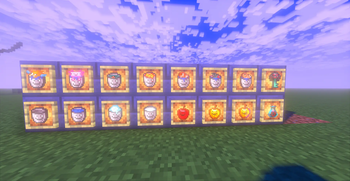

General
Simple resourcepack that does absolutely nothing but adds smiles to many utility items
Features
Here is every feature added in detail
- Apples have small smiley faces drawn on them
- Golden Apples(enchanted or not) have smiley faces drawn on them
- All Buckets have smiles
- Ominous bottles and ominous keys have smiles carved out of their faces
- More faces coming soon
Instalation
Default client
If you are using the default launcher:
- Download the .zip file
- drag it into the resourcepack folder in the .minecraft directory (it should be ..AppData/Roaming/.minecraft/resourcepacks)
- Open the game and activate the pack
Mod client
If you are using a mod launcher (modrinth, curseforge, ATLauncher) then install it from the launcher into the instance and then activate it ingame
Using the pack
You may modify redistribute, or use the software however you desire given that you provide attribution to the original pack. When redistributing the redistribution must be fully open-source and have all changes made to the pack (if any) clearly stated. The source code must be provided upon redistribution and the redistributed copy must be liscenced under the GNU GPL (General Public Licence) v3.
My Profile
- Edition: Minecraft Java
- File type: .zip (resource pack)
- Minecraft versions listed: 1.20, 1.20.1, 1.20.2
- How to install: Download the .zip resource pack — do not unzip it. → Put it in .minecraft/resourcepacks. → Enable it in Options → Resource Packs.
- Where to get it: Opens on Modrinth — not every file is mirrored on our own servers.
Install steps are the general flow for this file type — How to install Minecraft Java resource packs walks through it step by step.
- Downloads as Smiling Items 1.1.zip
- Download size: 16 KB
- Download link checked 16 Oct 2026 — working
These come from our own check of the pack file, not from the source page.