
abc: transparent shields
I don't know my version or loader
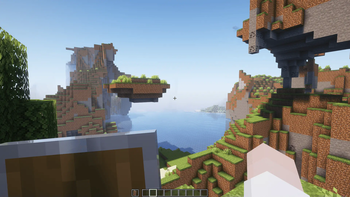
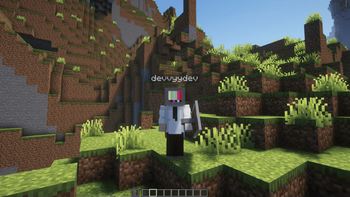
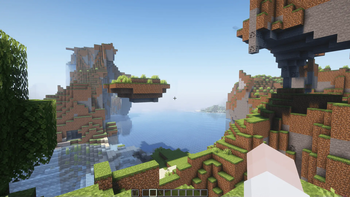
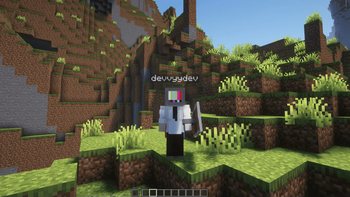




- No shield
- shows in 3rd person
Step-by-Step Guide
Open the Project Page
Visit the Modrinth, CurseForge, GitHub, or project website for the content you want to download.Find the Versions or Files Section
Look for a tab or section labelled Versions, Files, Releases, or Downloads.Select Your Minecraft Version
- Locate a list or dropdown called Version, Game Version, or Supported Versions.
- Pick the version that matches your Minecraft installation (e.g., 1.20.1, 1.19.2).
Choose the Correct File Type
The file type depends on the kind of content:- Mods:
.jar - Plugins:
.jar - Addons (Bedrock):
.mcaddon/.mcpack - Texture Packs:
.zip - Data Packs:
.zipor extracted folder - Capes / Skin Addons: whichever format the creator provides
- Mods:
Download the File
Click the Download, Get, or File button next to the version you need.
Save the file to your device.Install According to Content Type
- Mods: place the
.jarinside.minecraft/mods. - Plugins: move the
.jarinto your server’spluginsfolder. - Texture Packs: place the
.zipinto.minecraft/resourcepacks. - Data Packs: put inside
world/datapacks. - Addons (Bedrock): double-click
.mcaddonor.mcpackto import automatically.
- Mods: place the
Restart Minecraft or Your Server
Reload or restart to apply the new content.
- Edition: Minecraft Java
- File type: .zip (resource pack)
- Minecraft versions listed: 1.21, 1.21.1
- How to install: Download the .zip resource pack — do not unzip it. → Put it in .minecraft/resourcepacks. → Enable it in Options → Resource Packs.
- Where to get it: Opens on Modrinth — not every file is mirrored on our own servers.
Install steps are the general flow for this file type — How to install Minecraft Java resource packs walks through it step by step.
- Downloads as TransparentSheilds.zip
- Download size: 123 KB
- Download link checked 5 Sept 2026 — working
These come from our own check of the pack file, not from the source page.