
ResourcepacksJava
Lunar's Dark Mode
Java resource pack listed for Minecraft 1.19. Downloads from the MC Java Mods app on Android.
⬇ Download on Modrinth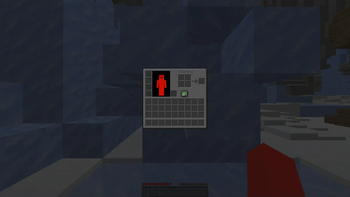
Why I Made This
Minecraft's UI Is WAY TOO BRIGHT (not as bright as discord light mode) but still. Whenever you open your inventory, FLASH BANG, so I fixed that.
What It Adds
This Pack Will Make EVERY GUI Darker.
My Socials
Discord: https://discord.gg/txhRenN2KH
Youtube: https://youtube.com/c/@LunarsVoid
Quick facts
- Edition: Minecraft Java
- File type: .zip (resource pack)
- Minecraft versions listed: 1.19, 1.19.1, 1.19.2
- How to install: Download the .zip resource pack — do not unzip it. → Put it in .minecraft/resourcepacks. → Enable it in Options → Resource Packs.
- Where to get it: Opens on Modrinth — not every file is mirrored on our own servers.
Install steps are the general flow for this file type — How to install Minecraft Java resource packs walks through it step by step.
File checked by MCModsHub
- Downloads as §cLunar's §8Dark Mode.zip
- Download size: 61 KB
- Download link checked 16 Oct 2026 — working
These come from our own check of the pack file, not from the source page.