
Diagonal Suite Bluemap Compat
I don't know my version or loader
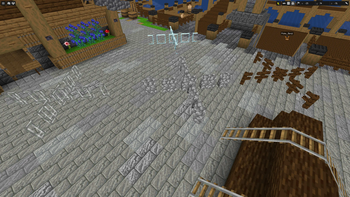
This pack adds compat between BlueMap and Fuzs's Diagonal Mods! Diagonal Fences Diagonal Windows Diagonal Walls
It currently has compatibility withUnless stated otherwise they only display non diagonal direction.
Vanilla Minecraft - Semi Functional Diagonal
Macaw's Fences - Oh The Biomes You'll Go / Oh The Biomes We've Gone
Installation StepsTo install a resource/data-pack you just need to put the pack-folder or zip into the folder packs next to your configuration files and reload BlueMap. BlueMap will scan the folder and try to load every resource it finds.
Sponge, Forge, Fabric: ./config/bluemap/packs/
Spigot/Paper: ./plugins/BlueMap/packs/ CLI: ./config/packs/
See the wiki for more information!
If you have suggestions for other mods to be added please leave a comment!
Also check out Kreffox's Diagonal Fences BlueMap Pack & Diagonal Windows BlueMap Pack! Their pack adds several compats that mine does not, i made this specifically to add Wall, Chipped, and Oh The Biomes We've Gone support!
I do not know how to fix the gaps, if anyone does and wants to share i will do my best to implement it!
- Edition: Minecraft Java
- File type: .zip (resource pack)
- Minecraft versions listed: 1.20, 1.20.1, 1.20.2
- How to install: Download the .zip resource pack — do not unzip it. → Put it in .minecraft/resourcepacks. → Enable it in Options → Resource Packs.
- Where to get it: Opens on Modrinth — not every file is mirrored on our own servers.
Install steps are the general flow for this file type — How to install Minecraft Java resource packs walks through it step by step.
- Downloads as DiagonalSuiteBluemapCompat.zip
- Download size: 1.7 MB
- Download link checked 6 Sept 2026 — working
These come from our own check of the pack file, not from the source page.