
ResourcepacksJava
SpEx Tooltips
Java resource pack listed for Minecraft 1.21. Downloads from the MC Java Mods app on Android.
⬇ Download on Modrinth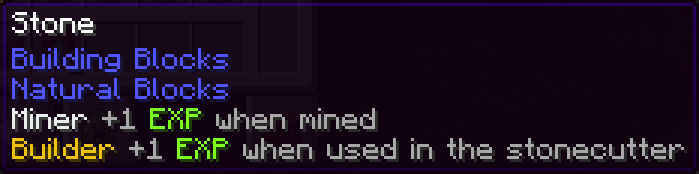
SpEx Classes Configuration
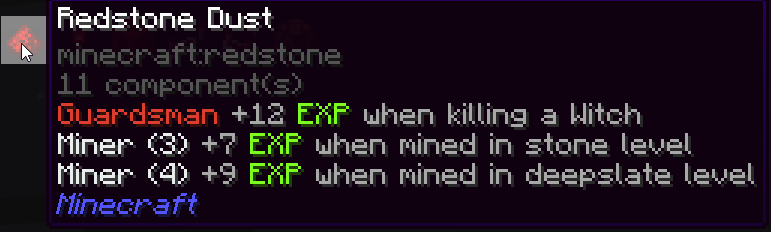
Item tooltips for the Specialization Experiment run by CivLabs. Unofficial pack.
How to Use
- Install the Tooltips DLP8 mod
- Copy this resource pack to your Minecraft resource packs folder
- Enable the resource pack in Minecraft
- The custom tooltips will automatically appear on the configured items
Configuration
The tooltip configurations are stored in assets/tooltips-dlp8/civlabs.jsonc.
CivLabs Classes Colors
#7e8c8d- Blacksmith (Gray)#f1c40f- Builder (Yellow)#2dc26b- Farmer (Green)#e03e2d- Guardsman (Red)#b96ad9- Healer (Purple)#3598db- Librarian (Blue)#ecf0f1- Miner (Light Gray)
Commands
/tooltips reload- Reload the configuration/tooltips help- Show help information
Quick facts
- Edition: Minecraft Java
- File type: .zip (resource pack)
- Minecraft versions listed: 1.21.6, 1.21.7, 1.21.8
- How to install: Download the .zip resource pack — do not unzip it. → Put it in .minecraft/resourcepacks. → Enable it in Options → Resource Packs.
- Where to get it: Opens on Modrinth — not every file is mirrored on our own servers.
Install steps are the general flow for this file type — How to install Minecraft Java resource packs walks through it step by step.
File checked by MCModsHub
- Downloads as SpExClassesConfiguration-0.1.2.zip
- Download size: 25 KB
- Download link checked 17 Oct 2026 — working
These come from our own check of the pack file, not from the source page.