Minecraft Font Enhancement Resource Pack
Overview
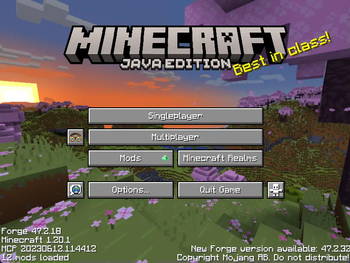
Enhance the aesthetics of Minecraft fonts with this Resource Pack, designed to bring a touch of authenticity and nostalgia to your Minecraft experience. Dive into the world of blocky adventures with fonts that seamlessly blend with the game's iconic style.
Features
- Better font!
- Blockier shapes for the font!
Reasons to download
- To make your non-Lunar Client minecraft look more like Lunar Client!
- Make the fonts more square-like!
Installation Guide
Requirements
- Minecraft Java Edition installed on your computer ig
- Access to the .minecraft and .minecraft > resourcepacks folder
Steps
- Download the Resource Pack: Click the green Download button on the version you desire.
- Locate the Minecraft Resource Pack Folder: Follow the step-by-step instructions provided in our installation guide.
- Move the Resource Pack Files: Copy, move (or cut idc) the downloaded ZIP file and paste it into the resource pack folder.
- Enable the Resource Pack in Minecraft: Launch Minecraft, navigate to Options, and select Resource Packs. Move the pack to the "Selected" list and click Done.
Experience the New Look
Enjoy your new font!
FAQ

Q: Is this available for bedrock?
A: Unfortunately, no. However, i encourage bedrock players to make their own bedrock version! :D
Q: Will this affect my performance?
A: Yes, but neglible. This is only a texture pack, so it wont affect your performance drastically.
Q: What is MFFP?
A: It is a texture pack designed to fit the font with minecraft's aestethic.
Q: How can i download it?
A: The steps are in the description.
Q: Where can i get MFFP?
A: You can get it in Modrinth > Minecraft Fitting Font Project > Versions.
Q: Can i customize the fonts?
A: You can modify the resource pack files to edit the fonts.
Crafted (pun haha!!,,,!!!1) with love by isoextension. Licensed MIT.
- Edition: Minecraft Java
- File type: .zip (resource pack)
- Minecraft versions listed: 1.20, 1.20.1
- How to install: Download the .zip resource pack — do not unzip it. → Put it in .minecraft/resourcepacks. → Enable it in Options → Resource Packs.
- Where to get it: Opens on Modrinth — not every file is mirrored on our own servers.
Install steps are the general flow for this file type — How to install Minecraft Java resource packs walks through it step by step.
- Downloads as Minecraft-Fitting Fonts 1.20.1.zip
- Download size: 707 KB
- Download link checked 7 Sept 2026 — working
These come from our own check of the pack file, not from the source page.