
the copper age title
This resource pack, Copper Update Title, is a specialized creation designed to enhance the visual experience of Minecraft players, specifically targeting…
⬇ Download on Modrinth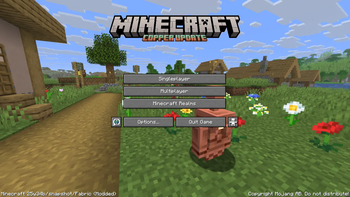

English
Description
The the copper age title resource pack is a unique visual modification for Minecraft, meticulously crafted by emad611985. Its primary purpose is to introduce a thematic title screen that resonates with the highly anticipated Copper Update (version 1.21.9). Unlike resource packs that overhaul vast aspects of the game, this pack offers a focused and elegant change, specifically altering the edition.png file within the game's textures to display a custom "MINECRAFT COPPER UPDATE" title.
This pack is ideal for players who:
- Are excited about the Copper Update and wish to see its theme reflected from the moment they launch the game.
- Appreciate subtle yet impactful visual enhancements.
- Seek to personalize their Minecraft experience with thematic consistency.
The pack.mcmeta file indicates a pack_format of 34, ensuring compatibility with Minecraft versions that support this format, specifically targeting the 1.21.9 update. The description within the pack itself, "§eCopper update title", uses Minecraft's internal color codes to display the title in a vibrant yellow, further emphasizing the theme.
Key Features:
- Thematic Title Screen: Replaces the default title screen text with a custom "MINECRAFT COPPER UPDATE" graphic.
- Subtle Enhancement: Provides a focused visual change without altering core gameplay textures.
- Compatibility: Designed for Minecraft version 1.21.9 and compatible versions supporting
pack_format34. - Creator Attribution: Made by emad611985.
Installation Guide:
- Download the Resource Pack: Obtain the
§a§lcopperupdatetittle.zipfile. - Locate your Minecraft Directory:
- Windows: Press
Win + R, type%appdata%\.minecraft, and press Enter. - macOS: Open Finder, click
Goin the menu bar, holdOption, and clickLibrary. Then navigate toApplication Support/minecraft. - Linux: Navigate to
~/.minecraft.
- Windows: Press
- Open the
resourcepacksFolder: Inside your.minecraftdirectory, you will find a folder namedresourcepacks. Open it. - Place the Zip File: Drag and drop the downloaded
§a§lcopperupdatetittle.zipfile directly into theresourcepacksfolder. Do not unzip the file. - Activate in Minecraft:
- Launch Minecraft.
- From the main menu, click
Options.... - Click
Resource Packs.... - Locate "Copper Update Title" in the list of available resource packs on the left.
- Click the arrow button on the pack icon to move it to the "Selected Resource Packs" list on the right.
- Click
Done.
Your game's title screen should now reflect the Copper Update theme!
العربية
الوصف
حزمة موارد عنوان تحديث النحاس (the copper age) هي تعديل بصري فريد لماينكرافت، تم تصميمه بدقة بواسطة emad611985. هدفها الأساسي هو تقديم شاشة عنوان موضوعية تتوافق مع تحديث النحاس المرتقب بشدة (الإصدار 1.21.9). على عكس حزم الموارد التي تُحدث تغييرات شاملة في جوانب واسعة من اللعبة، تقدم هذه الحزمة تغييرًا مركزًا وأنيقًا، حيث تقوم بتعديل ملف edition.png داخل نسيج اللعبة لعرض عنوان مخصص "MINECRAFT COPPER UPDATE".
هذه الحزمة مثالية للاعبين الذين:
- متحمسون لتحديث النحاس ويرغبون في رؤية سمته منعكسة منذ لحظة إطلاق اللعبة.
- يقدرون التحسينات البصرية الدقيقة ولكنها مؤثرة.
- يسعون لتخصيص تجربتهم في ماينكرافت باتساق موضوعي.
يشير ملف pack.mcmeta إلى pack_format بقيمة 34، مما يضمن التوافق مع إصدارات ماينكرافت التي تدعم هذا التنسيق، وتستهدف بشكل خاص تحديث 1.21.9. الوصف داخل الحزمة نفسها، "§eCopper update title"، يستخدم أكواد الألوان الداخلية لماينكرافت لعرض العنوان باللون الأصفر الزاهي، مما يزيد من تأكيد السمة.
الميزات الرئيسية:
- شاشة عنوان موضوعية: تستبدل نص شاشة العنوان الافتراضي برسم مخصص "MINECRAFT COPPER UPDATE".
- تحسين دقيق: يوفر تغييرًا بصريًا مركزًا دون تغيير نسيج اللعب الأساسي.
- التوافق: مصمم لإصدار ماينكرافت 1.21.9 والإصدارات المتوافقة التي تدعم
pack_format34. - نسبة للمنشئ: تم إنشاؤه بواسطة emad611985.
دليل التثبيت:
- تنزيل حزمة الموارد: احصل على ملف
§a§lcopperupdatetittle.zip. - تحديد موقع دليل ماينكرافت الخاص بك:
- ويندوز: اضغط
Win + R، اكتب%appdata%\.minecraft، ثم اضغط Enter. - ماك أو إس: افتح Finder، انقر على
Goفي شريط القائمة، اضغط باستمرار علىOption، ثم انقر علىLibrary. ثم انتقل إلىApplication Support/minecraft. - لينكس: انتقل إلى
~/.minecraft.
- ويندوز: اضغط
- افتح مجلد
resourcepacks: داخل دليل.minecraftالخاص بك، ستجد مجلدًا باسمresourcepacks. افتحه. - ضع ملف Zip: اسحب وأفلت ملف
§a§lcopperupdatetittle.zipالذي تم تنزيله مباشرة في مجلدresourcepacks. لا تقم بفك ضغط الملف. - التنشيط في ماينكرافت:
- شغل ماينكرافت.
- من القائمة الرئيسية، انقر على
Options.... - انقر على
Resource Packs.... - حدد موقع "Copper Update Title" في قائمة حزم الموارد المتاحة على اليسار.
- انقر على زر السهم الموجود على أيقونة الحزمة لنقلها إلى قائمة "Selected Resource Packs" على اليمين.
- انقر على
Done.
يجب أن تعكس شاشة عنوان لعبتك الآن سمة تحديث النحاس!
- Edition: Minecraft Java
- File type: .zip (resource pack)
- Minecraft versions listed: 25w31a, 25w32a, 25w33a
- How to install: Download the .zip resource pack — do not unzip it. → Put it in .minecraft/resourcepacks. → Enable it in Options → Resource Packs.
- Where to get it: Opens on Modrinth — not every file is mirrored on our own servers.
Install steps are the general flow for this file type — How to install Minecraft Java resource packs walks through it step by step.
- Downloads as §a§lcopper update tittle.zip
- Download size: 37 KB
- Download link checked 7 Sept 2026 — working
These come from our own check of the pack file, not from the source page.