
The Stupidest Pack
Java resource pack listed for Minecraft 1.21. Downloads from the MC Java Mods app on Android.
⬇ Download on Modrinth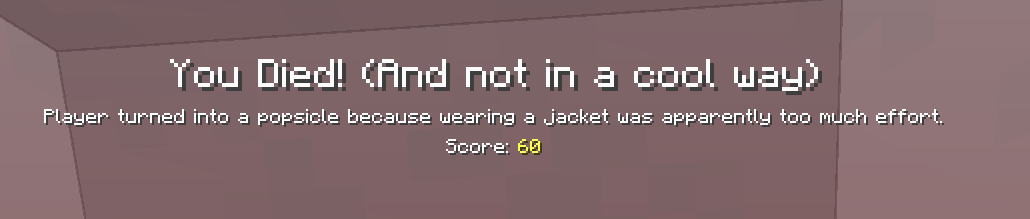
Information
Note: This is not going to have any updates, it sounds very stupid for my first thing i have shared here, to let you know, this may still work in versions apart from what's been supported already otherwise something breaks, if that is, not my problem
This resource pack modifes all (mostly) minecraft's languages and some of minecraft's messages to be just, stupidly... or whatever
PLEASE READ
This is a pack targeted at people over +16 and older, if you are going to use this for a video or a stream please warn your audience that this is a +16 video due to the pack's messages, including if your stream is uploaded to an VOD channel
For versions 1.0x and future versions (until i fix it) if you are a english speaker and you want to use this pack, please use either English (United States) or English (United Kingdom) when the pack is on as it isn't translated yet to the other english languages
Versions
- 1.21x (1.21.5 support ADDED)
- 1.20.x
FAQs
Will you port this to other minecraft versions?No, i want to focus on 1.20/1.21x and higher, as i've tested in versions prior to 1.19 there was some problems upon

The Return To Game, Online Options Button and Player Reporting butons has a lot of spaces (Online Options) or a lot of characters (Player Reporting, Return To Game), on versions below 1.19.4 it would be like the image shown up, but on 1.19.4 it does not happen that as it slowly moves from letter to letter
And 2nd, on all 1.19 versions, the /kill generic string is different, as on 1.20x and higher this does display the custom /kill generic message correctly and i am lazy to update this actually, so no
Will you add more stupidly translations?For future versions, and, for this case, if i want
Why does minecraft tell that is for a newer version on 1.20.5/1.20.6? 
i dont even know, bug on minecraft 1.20.5/6 but it works as i tested
Why the pack is focused for ages +16?The pack's messages, seems obvious
- Edition: Minecraft Java
- File type: .zip (resource pack)
- Minecraft version listed: 1.21.5
- How to install: Download the .zip resource pack — do not unzip it. → Put it in .minecraft/resourcepacks. → Enable it in Options → Resource Packs.
- Where to get it: Opens on Modrinth — not every file is mirrored on our own servers.
Install steps are the general flow for this file type — How to install Minecraft Java resource packs walks through it step by step.
- Downloads as The Stupidest Pack - v1.0 - 1.21.5.zip
- Download size: 84 KB
- Download link checked 19 Oct 2026 — working
These come from our own check of the pack file, not from the source page.