
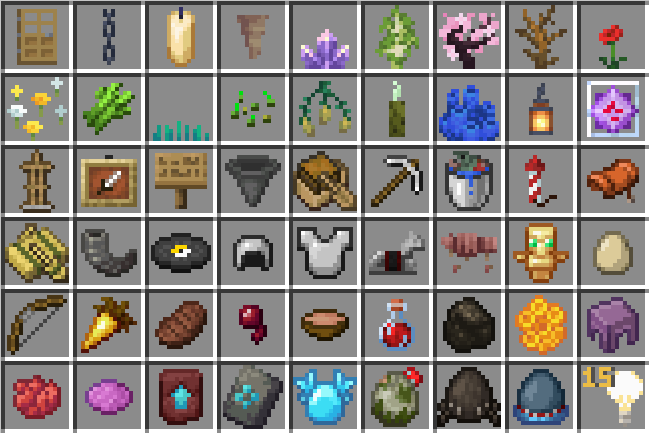
Ever notice how some of the items inventory icons aren't centered? Well now you have. This pack fixes it, even if an item is an odd number of pixels, by translating the texture using the JSON file. This means even if you use a resource pack that slightly modifies the colors of an image, this pack should still center it. If you have a resource pack that greatly changes the original texture, it may become off center. Some items, like flowers, mushrooms, and sapling, are only centered horizontally so that they stay on the bottom edge. Additionally, this pack move the youngest 3 Amethyst Buds and the Nether Sprouts textures down to the bottom edge.
If you have a resource pack that significantly alters a texture or use mods that add items, you can center things yourself. Copy the items .json file from the version .jar under assets\minecraft\models\item for most items or assets\minecraft\model\block for items that use their blocks texture for the item texture (think trees or flowers) then copy the "display" item from any of the existing .json files in my resource pack. Shift the first two numbers of gui translation as the x and y as necessary (decimals are allowed) and change the values of the ground translation to roughly the x translation divided by two and the y translation multiplied by 2. Keep the scale as 0.5 for all 3 values.
Example .json for the Carrot on a Stick:
{
    "parent": "minecraft:item/handheld_rod",
    "textures": {
        "layer0": "minecraft:item/carrot_on_a_stick"
    },
    "display": {
        "gui": {
            "translation": [
                -0.5,
                0.5,
                0
            ]
        },
        "ground": {
            "translation": [
                -0.25,
                1.0,
                0
            ],
            "scale": [
                0.5,
                0.5,
                0.5
            ]
        }
    }
}
- Edition: Minecraft Java
- File type: .zip (resource pack)
- Minecraft version listed: 1.21.5
- How to install: Download the .zip resource pack — do not unzip it. → Put it in .minecraft/resourcepacks. → Enable it in Options → Resource Packs.
- Where to get it: Opens on Modrinth — not every file is mirrored on our own servers.
Install steps are the general flow for this file type — How to install Minecraft Java resource packs walks through it step by step.
- Downloads as Ultimate Item Centerer - 1.0.zip
- Download size: 146 KB
- Download link checked 8 Sept 2026 — working
These come from our own check of the pack file, not from the source page.