![💠Bright Light [Highlighter]](https://cdn.modrinth.com/data/i7deEtPO/2066afb659f7a69849202b76ebea7e304244f0f5.png)
ResourcepacksJava
💠Bright Light [Highlighter]
-->[en]: A more contrasting texture for the [Highlighter]. -->[ru]: Более контрастная текстура для [Highlighter].
I don't know my version or loader
Open the Minecraft launcher and look at the profile you play on — it names both, like fabric-loader-1.21.4. The version also shows in the bottom-right corner of the game's main menu.
No loader in the profile name? Then it's plain Minecraft, and these mods won't run — you need Fabric or NeoForge installed first.
![💠Bright Light [Highlighter] — screenshot 1](https://cdn.modrinth.com/data/i7deEtPO/images/86a4d41d721e4810ee9393d54419acf2b4b1192d.png)
![💠Bright Light [Highlighter] — screenshot 2](https://cdn.modrinth.com/data/i7deEtPO/images/a0d26a3730fd6fed2f58db2b23d5c4a4344d6f9a.png)
Bright Light [Highlighter] || Яркий свет [Highlighter]
This resource pack will change the texture of the marker of the raised object from the "Highlighter" mod to a more contrasting one.
Данный пакет ресурсов изменит текстуру маркера поднятого предмета из мода "Highlighter" на более контрастную.
0. An example from the mod || Пример из мода:
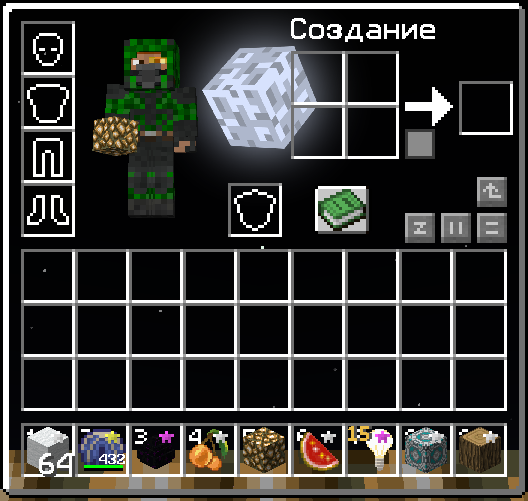
1. Resource Packs 16x || Пакетов ресурсов 16x:
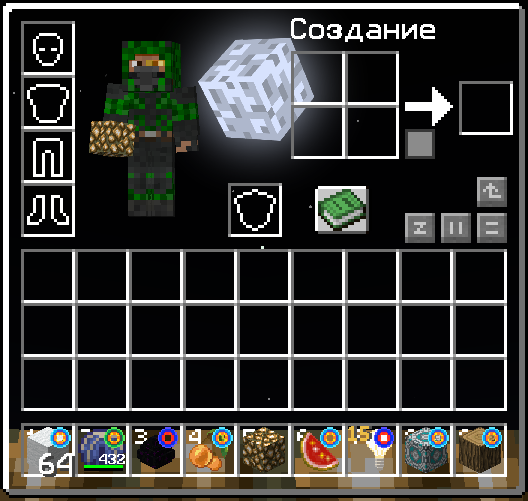
Quick facts
- Edition: Minecraft Java
- File type: .zip (resource pack)
- Minecraft versions listed: 1.20.2, 1.20.4, 1.20.5
- How to install: Download the .zip resource pack — do not unzip it. → Put it in .minecraft/resourcepacks. → Enable it in Options → Resource Packs.
- Where to get it: Opens on Modrinth — not every file is mirrored on our own servers.
Install steps are the general flow for this file type — How to install Minecraft Java resource packs walks through it step by step.
Verified by MCModsHub
- Downloads as Bright Light 16x [Highlighter] [1.20.2-1.21.4].zip
- Download size: 8 KB
- Download link checked 8 Sept 2026 — working
These come from our own check of the pack file, not from the source page.