

LCE Potion Bar - Modernized (LPBM)
LPBM Brings the old legacy console edition potion bars which show the stats of the potion on the icon but in an improved and modern style.
Potion Bars & Types:
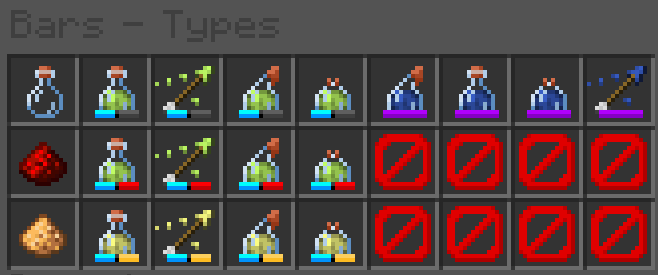
All Potions That Give An Effect Will Have A Blue Section of the bar, Next To That Blue Section Is A Secondary Area:
- If it's Empty, The potion has no modifers placed on it.
- If It's Red, The potion has been extended with redstone.
- If It's Yellow, The potion has been amplified with glowstone.
[The following do not show the blue bar.]
- If It's purple, it does not give any effect.
- If It's orange, it means the potion is either custom, or unknown. (you may see this if you use unobtainable potions.)
The Bars Will Only Display Within The UI.
Quick facts
- Edition: Minecraft Java
- File type: .zip (resource pack)
- Minecraft versions listed: 1.21.6, 1.21.7, 1.21.8
- How to install: Download the .zip resource pack — do not unzip it. → Put it in .minecraft/resourcepacks. → Enable it in Options → Resource Packs.
- Where to get it: Opens on Modrinth — not every file is mirrored on our own servers.
Install steps are the general flow for this file type — How to install Minecraft Java resource packs walks through it step by step.
Verified by MCModsHub
- Downloads as [1.21.6+] LCE Potion Bar - Modernized.zip
- Download size: 120 KB
- Download link checked 8 Sept 2026 — working
These come from our own check of the pack file, not from the source page.