
yet another lightsabers
Java resource pack listed for Minecraft 1.21–26.x. Downloads from the MC Java Mods app on Android.
⬇ Download on Modrinth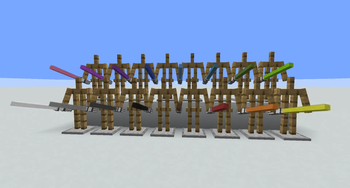


What is this?
This resource pack allows you to change any sword to lightsaber - now in 16 colors.
How to install
Download and put in minecraft/resourcepacks folder. Then remember to select it in game.
How to use
Option 1:
Simply rename any sword on the anvil. The names that work:
- white lightsaber
- light gray lightsaber
- gray lightsaber
- black lightsaber
- brown lightsaber
- red lightsaber
- orange lightsaber
- yellow lightsaber
- lime lightsaber
- green lightsaber
- cyan lightsaber
- light blue lightsaber
- blue lightsaber
- purple lightsaber
- magenta lightsaber
- pink lightsaber
There has to be space between color and lightsaber. In general, colors are the same as in vanilla colored blocks, for example glass.
This option works only on swords.
Option 2:
You can also access models by /give command. This way you can put this model on ANY minecraft item.
Example:
/give @s minecraft:wooden_sword[minecraft:item_model="minecraft:red_lightsaber"]
You can use any other item instead of wooden sword. To get other colors, simply change the color in the name (colors like above).
Option 3:
It is possible to use it with other data packs, for example ModelApplier. If you want to do it this way for some reason, then names must have underscore instead of space, for example:
- red_lightsaber
- green_lightsaber
- light_blue_lightsaber
This way you also can put it on any item, not only swords. Works for all colors listed above.
Good to know
It is my first published resource pack :D
I added all the colors, since they use vanilla glass texture anyway. Some of the colors may not be the prettiest, but maybe you would like it :)
- Edition: Minecraft Java
- File type: .zip (resource pack)
- Minecraft versions listed: 1.21.11, 26.1, 26.1.1
- How to install: Download the .zip resource pack — do not unzip it. → Put it in .minecraft/resourcepacks. → Enable it in Options → Resource Packs.
- Where to get it: Opens on Modrinth — not every file is mirrored on our own servers.
Install steps are the general flow for this file type — How to install Minecraft Java resource packs walks through it step by step.
- Downloads as lightsabers_by_g0ld_2.zip
- Download size: 54 KB
- Download link checked 19 Oct 2026 — working
These come from our own check of the pack file, not from the source page.