
Taigicraft
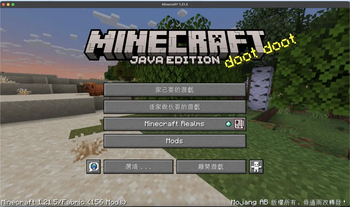
Tī Minecraft 內底使用台語。在 Minecraft 內使用臺灣台語。
Use Taigi (Taiwanese) in Minecraft.
使用ê方法
Hōo使用者
- Tī阮ê Modrinth 頁面下載資源包。
- Kā伊囥入 Minecraft ê資源包資料夾內,然後tī遊戲中kā伊開啟。
- 揣著言語設定,kā言語設定做臺灣台語。
- 開始耍!
Hōo翻譯貢獻者
- Fork 這个 repo。
- 檢查Kah修改
files/dev/version檔案中ê字。 - 開一个 Pull Request。
Hōo開發者
deno run tHōo系統初步翻譯文字。deno run b [版本號碼]將檔案做成一个.zip資源包檔案。- 佇咧
output/資料夾內底揣著資源包,並且共複製過方塊遊戲的資料夾中。
使用方式
給使用者
- 從我們的 Modrinth 頁面下載資源包。
- 把它放進 Minecraft 的資源包資料夾內,並在遊戲中啟用它。
- 找到語言設定,並將語言設定為臺灣台語。
- 開始玩 Minecraft!
給翻譯貢獻者
- Fork 這個儲存庫。
- 檢查並修改
files/dev/version檔案中的字串。 - 開一個 Pull Request。
給開發者
deno run t讓系統初步翻譯文字。deno run b [版本號碼]將檔案做成一個.zip資源包檔案。- 在
output/資料夾內找到資源包,並且複製到 Minecraft 的資料夾中。
English
For users
- Download the resource pack from our Modrinth page.
- Drop it into Minecraft's resource packs folder, then enable it in-game.
- Look for the language settings and set the language to "臺灣台語."
- Start playing Minecraft!
For translation contributors
- Fork this repo.
- Check and modify strings in the
files/dev/versionfile. - Open a PR.
For developers
deno run tto let the system translate strings.deno run b [Version Code]to package it into a.zipfile.- Find the resource pack in
output/folder and copy it into Minecraft's folder.
Support
Credits
- Machine translation from iptcloud.net
- PaperMC's ISSUE_TEMPLATE
- Icon generated by Google Gemini
- mcasset.cloud
Quick facts
- Edition: Minecraft Java
- File type: .zip (resource pack)
- Minecraft versions listed: 1.21, 1.21.1, 1.21.2
- How to install: Download the .zip resource pack — do not unzip it. → Put it in .minecraft/resourcepacks. → Enable it in Options → Resource Packs.
- Where to get it: Opens on Modrinth — not every file is mirrored on our own servers.
Install steps are the general flow for this file type — How to install Minecraft Java resource packs walks through it step by step.
Verified by MCModsHub
- Downloads as Taigicraft-1.21.5.zip
- Download size: 426 KB
- Download link checked 10 Sept 2026 — working
These come from our own check of the pack file, not from the source page.