
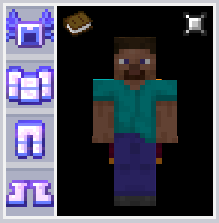
 This is just an example, in the game the armor is completely invisible.
I will be very grateful if you subscribe to Lena's OPG | Textures.
How does it work?
- It's very simple: Every armor texture (except the one that uses the 3D model to display in the inventory) has been replaced with a transparent pixel with a resolution of 1x1.
In the future, I plan to update this set and add support for more modifications.
This can it boost FPS?
- In theory, this is possible if you are on a large server with many players at one point. Or, if you use modifications with complex armor models (Example: Botania and addons to it).
Note: Unfortunately, not all modifications can work correctly without armor textures, known ones include Draconic Evolution and some armor from TechGuns. Perhaps I'll make a separate list with incompatibilities.
Supported mods:
1.7.10:
- Minecraft (Vanilla)
- IndustrialCraft 2
- DivineRPG
- TechGuns
- ThermalFoundation
- TheTwilightForest
- ThaumicTinkerer
- GraviSuite
- Avaritia (Wings not retracted, player not glowing)
- LoliEnergyRelics (Wings not retracted, player head glowing)
- Netherlicious
- Witchery (Bark belt not retracted)
- Botania
- Alfheim
1.12.2:
- Minecraft (Vanilla)
- IndustrialCraft 2
- DivineRPG
- TechGuns
- ThermalFoundation
- GraviSuite
- Avaritia (Wings not retracted, player not glowing)
- Botania
Quick facts
- Edition: Minecraft Java
- File type: .zip (resource pack)
- Minecraft version listed: 1.12.2
- How to install: Download the .zip resource pack — do not unzip it. → Put it in .minecraft/resourcepacks. → Enable it in Options → Resource Packs.
- Where to get it: Opens on Modrinth — not every file is mirrored on our own servers.
Install steps are the general flow for this file type — How to install Minecraft Java resource packs walks through it step by step.
Verified by MCModsHub
- Downloads as InvisibleArmor-Vanilla-Mods-1.12.2-1.1.zip
- Download size: 88 KB
- Download link checked 10 Sept 2026 — working
These come from our own check of the pack file, not from the source page.