
Neutral Tooltip
Neutral Tooltip transforms the tooltip to use a neutral grey colour scheme that works well with Minecraft's vanilla font colours. I wanted to make this resource pack because I didn't like that every item had a purplish background and I felt like those colours didn't always match well with the items they were displaying. In the end it comes down to personal preference, but I generally like the tooltip from this resource pack more than vanilla Minecraft's.
Showcase
Here is an item with lore that contains every font colour available in vanilla Minecraft:
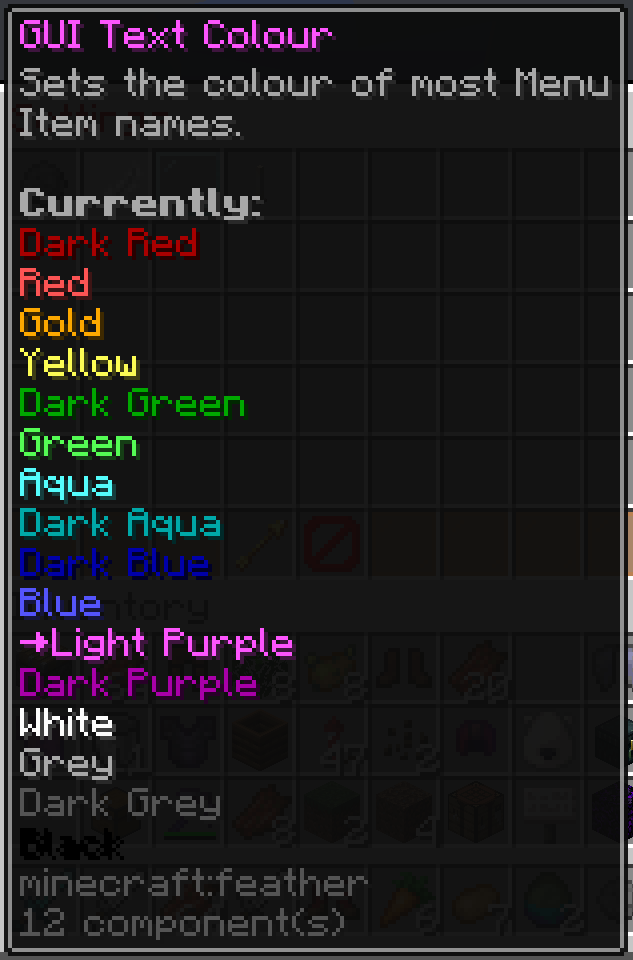
Dark Grey may be a little hard to read but if I make the tooltip any lighter it starts to interfere with Grey as well. I've found this grey to be a good middle ground. Black also kind of sucks to read but no resource pack will be able to change that as the drop shadow absolutely ruins Black.
- Edition: Minecraft Java
- File type: .zip (resource pack)
- Minecraft versions listed: 1.21.2, 1.21.3, 24w44a
- How to install: Download the .zip resource pack — do not unzip it. → Put it in .minecraft/resourcepacks. → Enable it in Options → Resource Packs.
- Where to get it: Opens on Modrinth — not every file is mirrored on our own servers.
Install steps are the general flow for this file type — How to install Minecraft Java resource packs walks through it step by step.
- Downloads as Neutral Tooltip v0.4 §6[1.21.2-26.1.2].zip
- Download size: 13 KB
- Download link checked 20 Aug 2026 — working
These come from our own check of the pack file, not from the source page.