
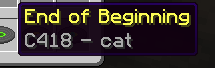
Title: DJO - DECIDE (Music Disc Replacement) Description This resource pack replaces the default Minecraft music discs with tracks from the album DECIDE by DJO.
If you're a fan of Joe Keery's music, this pack is for you! It changes the audio, the names of the discs in your inventory, and the "Now Playing" messages to match the album's vibe.
Features Custom Music: Replaces several vanilla discs with high-quality .ogg tracks.
Updated Names: All modified discs show the correct song title and artist (DJO).
Immersive: The "Now Playing" pop-up correctly displays the new song info.
Tracklist (Current) Cat → End of Beginning
13 → Fool
Blocks → On and On
5 → Runner
Far → Bloom (More tracks coming soon!)
How to use Download the .zip file.
Place it in your resourcepacks folder.
Activate it in-game (Options > Resource Packs).
Note: If the pack appears red (incompatible), you can still click "Yes" to activate it; it will work perfectly on version 1.21.10!
Disclaimer: All music belongs to DJO. This is a fan-made project.
- Edition: Minecraft Java
- File type: .zip (resource pack)
- Minecraft versions listed: 1.21, 1.21.1, 1.21.2
- How to install: Download the .zip resource pack — do not unzip it. → Put it in .minecraft/resourcepacks. → Enable it in Options → Resource Packs.
- Where to get it: Opens on Modrinth — not every file is mirrored on our own servers.
Install steps are the general flow for this file type — How to install Minecraft Java resource packs walks through it step by step.
- Downloads as DECIDE - DJO v1.zip
- Download size: 11.4 MB
- Download link checked 11 Sept 2026 — working
These come from our own check of the pack file, not from the source page.