
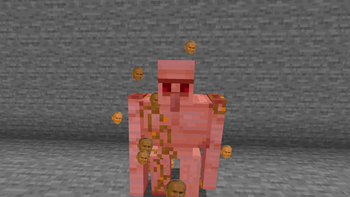


John Paul II Critical Hit Particles texture pack
This resource pack modifies Minecraft’s default critical hit particles to display the face of John Paul II, bringing a unique touch to your gameplay experience.
Installation Instructions:
Download the resource pack.
Place the .zip file in your Minecraft's resourcepacks folder located at %APPDATA%/.minecraft/resourcepacks.
Launch Minecraft, go to Options, then Resource Packs.
Select the John Paul II Critical Hit Particles pack and click "Done".
Enjoy the new particles during your critical hits!
Features:
Replaces the default critical hit particles with the face of John Paul II.
Compatible with other resource packs and does not require any external mods.
It's funny
FAQ:
Q: Does this work with my existing resource pack? A: Yes, this resource pack works with any resource pack you’re using, as it only modifies particle effects.
Q: Do I need any mods to use this resource pack? A: No, this is purely a resource pack and does not require any mods to function.
Credits:
Creator: tozderof
Special thanks to the community for their support and feedback.
- Edition: Minecraft Java
- File type: .zip (resource pack)
- Minecraft version listed: 1.19.2
- How to install: Download the .zip resource pack — do not unzip it. → Put it in .minecraft/resourcepacks. → Enable it in Options → Resource Packs.
- Where to get it: Opens on Modrinth — not every file is mirrored on our own servers.
Install steps are the general flow for this file type — How to install Minecraft Java resource packs walks through it step by step.
- Downloads as Papaj Destroyer.zip
- Download size: 258 KB
- Download link checked 11 Sept 2026 — working
These come from our own check of the pack file, not from the source page.