
DatapacksJava
Trusted Colors
Adds a sophisticated name-color switching system to the game, complete with live and rec tags as well as an RP tag.
⬇ Download on ModrinthColor Selection
Using the command:
/trigger color
Will bring up a menu to select a color and status for your in game name
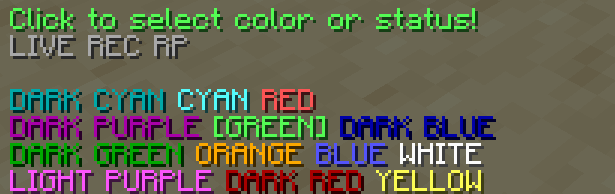
Clicking on the colors will select them and change the actual color of your name.
Status Selection
In the menu there are 3 buttons for different statuses. Clicking on these will make them show up next to your name in game:

Extra Features
An operator can use the command:
/tag add <playername> mod
This will make their name in chat show up with an [OP] tag

The OP tag is compatible with all other tags and colors!
Quick facts
- Edition: Minecraft Java
- File type: .jar
- Minecraft version listed: 1.21
- How to install: Install the matching mod loader (Forge, Fabric or NeoForge) for your Minecraft version. → Download the .jar. → Put it in the .minecraft/mods folder and launch that loader profile.
- Where to get it: Opens on Modrinth — not every file is mirrored on our own servers.
Install steps are the general flow for this file type — see the MC Java Mods guides for the full walkthrough.
Verified by MCModsHub
- Downloads as trustedcolors_1.21.zip
- Download size: 21 KB
- Download link checked 8 Sept 2026 — working
These come from our own check of the pack file, not from the source page.