
Whopper Datapack
All features are showcased in this video: NEW ITEMS: Cutting Board - [Crafting: 2 wooden slabs in crafting table] Bun - [Crafting: Cut bread using flint…
⬇ Download on Modrinth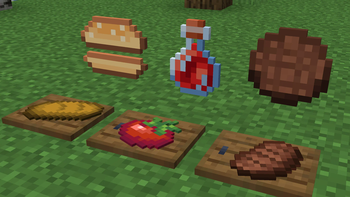
All features are showcased in this video: https://www.youtube.com/watch?v=r-Xwq9fjSes
NEW ITEMS:
- Cutting Board - [Crafting: 2 wooden slabs in crafting table]
- Bun - [Crafting: Cut bread using flint on the cutting board]
- Patty - [Crafting: Cut steak using flint on the cutting board]
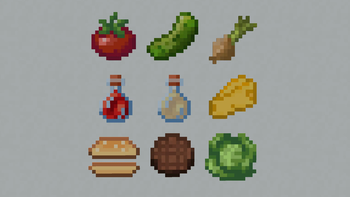
- Lettuce - [Found in village chests in the plains biome]
- Tomato - [Found in village chests in the plains biome]
- Pickle - [Found in village chests in the plains biome]
- Onion - [Found in village chests in the plains biome]
- Cheese - [Crafting: Throw a milk bucket into a composter]
- Ketchup - [Crafting: Cut tomato using flint on the cutting board, and then right click with a bottle]
- Mayonnaise - [Crafting: Cut egg using flint on the cutting board, and then right click with a bottle]
If you have op, you can type /function whopper:give_items to give yourself all the whopper parts
GAME MECHANICS
- Creating Whopper - to create a whopper, place down a bun. Then you can add any topping you like
- Eating Whopper - to eat a whopper, you need to place down another bun which becomes the top. Right click to eat. Amount of hunger filled up:
- 0 patties - 2 hunger bars
- 1-6 patties - +2 hunger bars for every patty
- 7-14 patties - Will inflict nausea, no hunger bars filled up
- 15+ patties - You will explode
- Cutting - Able to cut items on a cutting board using a piece of flint, can bottle up the items using a glass bottle. Break the cutting board by shift + right-clicking it
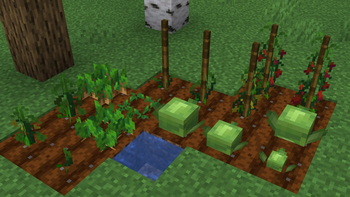
- Growing Crops - You can grow lettuce, tomatoes, pickles and onions. Find the in village chests in the plains biome.
⚠️ BUGS
There are some unfixable bugs in this datapack. No items can be duped, only can be lost. This only happens when quickly switching hotbar slots when eating or cutting, otherwise there is no problem. If you notice any unfair bugs report them in the [bugs] text channel in my discord server
⚠️ MULTIPLAYER
Haven't tested if this works. There shouldn't be big problems, however it might not work perfectly
DOWNLOAD
To download the datapack, you have two options to add it to your world: Creating a new world:
- Download the Whopper_Datapack.zip
- Click Create new world in minecraft
- Click Data Packs
- Drag the Whopper_Datapack.zip into there, and make sure you put it on the 'selected' side (right side)
Add to existing world:
- Download the Whopper_Datapack.zip
- Select your world in the single player menu
- Click Edit at the bottom of the screen
- Click Open World Folder
- Click on the datapacks folder
- Drag the Whopper_Datapack.zip into there
To download the resource pack, follow these steps:
- Download the Whopper_Resourcepack.zip
- In minecraft, click on Options
- Click on Resource Packs
- Drag the Whopper_Resourcepack.zip into there, and make sure you put it on the 'selected' side (right side)
- Edition: Minecraft Java
- File type: .jar
- Minecraft versions listed: 1.19, 1.19.1, 1.19.2
- How to install: Install the matching mod loader (Forge, Fabric or NeoForge) for your Minecraft version. → Download the .jar. → Put it in the .minecraft/mods folder and launch that loader profile.
- Where to get it: Opens on Modrinth — not every file is mirrored on our own servers.
Install steps are the general flow for this file type — see the MC Java Mods guides for the full walkthrough.
- Downloads as Whopper_Datapack_1.19.zip
- Download size: 36 KB
- Download link checked 8 Sept 2026 — working
These come from our own check of the pack file, not from the source page.