
DatapacksJava
ReAirDrop Datapack
This is not Official Datapack for ReAirDrop Download mod: I made datapack for ReAirDrop mod - it features Global AirDrop which spawns two different…
⬇ Download on Modrinth



This is not Official Datapack for ReAirDrop
Download mod: https://modrinth.com/mod/reairdrop-supply
I made datapack for ReAirDrop mod - it features Global AirDrop which spawns two different airdrops in one location (Normal and Medic) and Loottables for TACZ (Timeless and Classics Zero) and Apocalypse Addon
How to configure Global Airdrops:
/function airdrop:setup - setup procedure and how to make automatic airdrop spawn every 1 hour
/function airdrop:summon_airdrop - Manually spawning airdrop excluding timer


In total you'll need 5 commandblocks:
2 for automating airdrop every 1 hour (one is for adding each tick, second one is for checking if everything works correctly)
3 for announcing when airdrop is being picked up by a player

Here's the 3 commands for announcing picked up airdrop and how they supposed to be configured

# repeating commandblock (repeat / unconditional / always active)
execute at @a if entity @e[type=armor_stand,tag=airdrop,limit=1, distance=..3] run tellraw @a ["",{"text":"\n"},{"text":"Airdrop has been collected by","color":"yellow"},{"text":" "},{"selector":"@p","color":"red"},{"text":"\n "}]


# chain commandblock (chain / unconditional / always active)
execute at @a if entity @e[type=armor_stand,tag=airdrop,limit=1, distance=..3] run kill @e[type=armor_stand,tag=airdrop]


# chain commandblock (chain / unconditional / always active)
execute at @a if entity @e[type=armor_stand,tag=airdrop2,limit=1, distance=..4] run kill @e[type=armor_stand,tag=airdrop2]

## MORE TO READ IN readme-globalairdrop.txt ##
How to configure Loottables:
To edit those precious drops use website - https://misode.github.io/loot-table/
That website uses GUI to help you edit loottables.

Default Loottables for now is for TACZ and Apocalypse Addon
https://modrinth.com/mod/timeless-and-classics-zero
https://modrinth.com/mod/apocolypseaddons

Location of loottables files : \data\airdrop_supply\loot_tables
note: Currently Global Airdrop uses only Advanced Medic and Normal loottables for airdrops

To edit those just make Loottable on website or import code from one of my loottables and reference it
TACZ Loottables
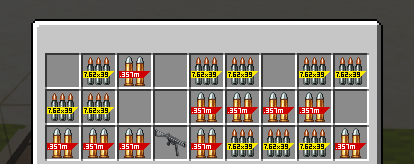
Apocalypse Addon Loottables

Quick facts
- Edition: Minecraft Java
- File type: .jar
- Minecraft version listed: 1.20.1
- How to install: Install the matching mod loader (Forge, Fabric or NeoForge) for your Minecraft version. → Download the .jar. → Put it in the .minecraft/mods folder and launch that loader profile.
- Where to get it: Opens on Modrinth — not every file is mirrored on our own servers.
Install steps are the general flow for this file type — see the MC Java Mods guides for the full walkthrough.
Verified by MCModsHub
- Downloads as ReAirDrop-datapack.zip
- Download size: 10 KB
- Download link checked 19 Aug 2026 — working
These come from our own check of the pack file, not from the source page.