
Dimensional Ring Guidebook!
In order to get your very own ring, you can craft it:

Once acuring your own ring, right click to get a menu:
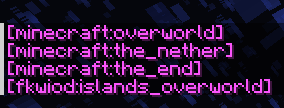
This will show up in chat, and click any dimensions that you wish to go.
For custom dimension you've installed, you must first go to that custom one & upon entering it, it will now enlist the dimension in the menu.
RECOURSE PACK REQUIRED!
You can find it alongside the datapack downloads.
Q&A
Why does it show :?
Due to how minecraft works & stores data, it does that.
Why do I neeed to enter a custom dimension first?
The datapack doesnt reconize the custom dimenisons that you've added, only knows of MC's default ones. IF you're setting up a server and want immediate acess for everyone: /execute in <namespace>:<name> run tp ~ ~ ~
Any other questions: Do join the discord server.
- Edition: Minecraft Java
- File type: .jar
- Minecraft version listed: 1.21
- How to install: Install the matching mod loader (Forge, Fabric or NeoForge) for your Minecraft version. → Download the .jar. → Put it in the .minecraft/mods folder and launch that loader profile.
- Where to get it: Opens on Modrinth — not every file is mirrored on our own servers.
Install steps are the general flow for this file type — see the MC Java Mods guides for the full walkthrough.
- Downloads as Dim Ring.zip
- Download size: 289 KB
- Download link checked 21 Aug 2026 — working
These come from our own check of the pack file, not from the source page.