
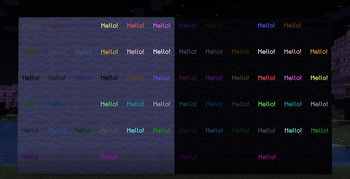
 Bring text displays into vanilla survival!
To craft fixed text display, you need paper, ink sac and any dye, then you need to rename the item on anvil and place it into frame (glowing frame makes text glow!).
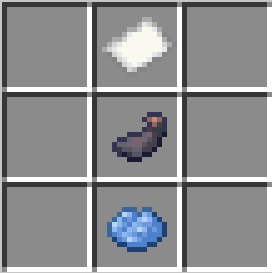
Tip #1: Use
\nfor newline, while renaming text item.
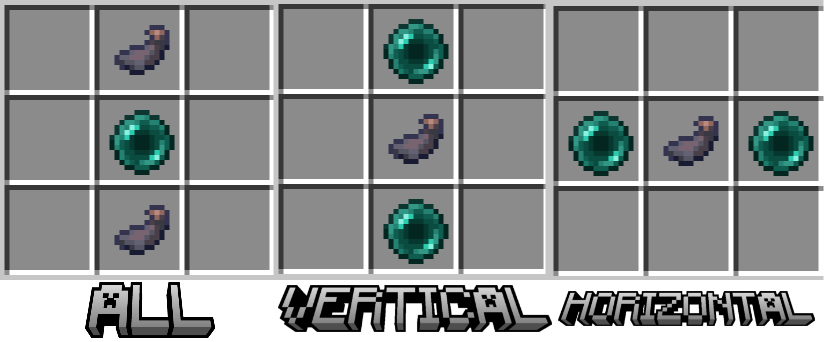 To craft rotating text display, you need ender pearl and ink sac, then you rename it and place it into frame.
To break text, left click on it. Warning! It won't drop after you break it.
Tip #2: You can click RMB to rotate texts that were placed on the floor/ceiling.
Quick facts
- Edition: Minecraft Java
- File type: .jar
- Minecraft version listed: 1.20.4
- How to install: Install the matching mod loader (Forge, Fabric or NeoForge) for your Minecraft version. → Download the .jar. → Put it in the .minecraft/mods folder and launch that loader profile.
- Where to get it: Opens on Modrinth — not every file is mirrored on our own servers.
Install steps are the general flow for this file type — see the MC Java Mods guides for the full walkthrough.
Verified by MCModsHub
- Downloads as Vanilla Displays v1.zip
- Download size: 32 KB
- Download link checked 21 Aug 2026 — working
These come from our own check of the pack file, not from the source page.