EzDiscordLink
The simplest way to share your Discord community with your players.
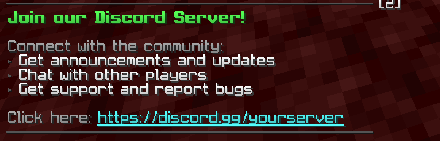
EzDiscordLink provides an elegant, no-fuss solution for servers wanting to connect their Minecraft community with Discord. With just a simple command, players can instantly access your server's Discord invite.
✨ Features
- Simple Commands - Players can use
/discordor/dcto get your server's Discord link - Rich Formatting - Beautiful, customizable messages with color codes and hover effects
- Multi-Display Options - Show invites via chat messages, action bar, or both
- Sound Notifications - Optional audio feedback when players use the command
- Fully Customizable - Every message, color, and format is configurable
- Lightweight - Minimal performance impact on your server
- Placeholder Support - Dynamic content with
{link}placeholder
⚙️ Config Preview
discord:
  link: "https://discord.gg/yourserver"

messages:
  chat-enabled: true
  actionbar-enabled: true
  hover: "&aClick to open Discord invite!"

sound:
  enabled: true
  type: "ENTITY_PLAYER_LEVELUP"
🎨 Customization
The plugin comes with a comprehensive config file that lets you control:
- Chat message format with multi-line support
- Hover tooltips for interactive links
- Action bar notifications
- Sound effects (type, volume, and pitch)
- Error messages
- Enable/disable individual features
All messages support Minecraft color codes (&a-&f) and formatting codes for complete visual control.
🚀 Quick Setup
- Drop the plugin into your
pluginsfolder - Restart your server
- Edit
config.ymland add your Discord invite link - Reload and you're done!
📋 Commands
/discord- Display the Discord invite/dc- Shorthand alias for/discord
Made with ❤️ by A3rial Studios
Quick facts
- Edition: Minecraft Java
- File type: .jar
- Minecraft versions listed: 1.8, 1.8.1, 1.8.2
- How to install: Install the matching mod loader (Forge, Fabric or NeoForge) for your Minecraft version. → Download the .jar. → Put it in the .minecraft/mods folder and launch that loader profile.
- Where to get it: Opens on Modrinth — not every file is mirrored on our own servers.
Install steps are the general flow for this file type — How to install Minecraft Java mods & modpacks walks through it step by step.
Verified by MCModsHub
- Ships as EzDiscordLink-1.0-SNAPSHOT.jar — drop this file into the mods folder
- Download size: 8 KB
- Download link checked 10 Sept 2026 — working
These come from our own check of the pack file, not from the source page.