





What can SentinelMC do?
SentinalMC is not very extraordinary, but it's not supposed to be. It should be a simple yet effective moderation solution for Minecraft servers, who don't want to put lots and lots of mind into their moderation plugins.
SentinelMC supports MongoDB, MySQL and SQLite out of the box, with SQLite being the default which enables server owners to simply drag-and-drop the plugin into the server's plugin folder, restart the server and start using SentinelMC.
So, how do I install it?
It's as simple as installing any other plugin. Download the .jar-file from the GitHub and just drop it into your servers plugins folder. Restart your server and you should be good to go!
Features
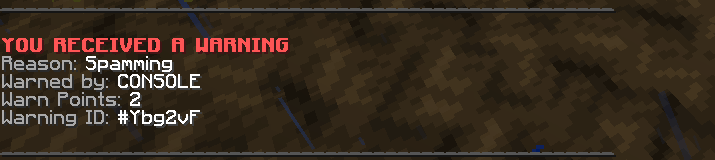
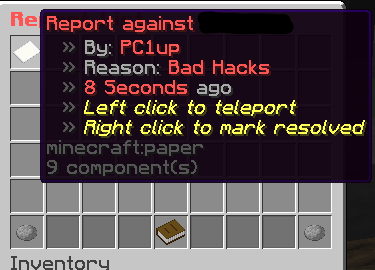
SentinelMC has a ban, mute, warning, report and miscellaneous functionalities. The ban module features permanent and temporary bans, just like the mute module Warnings allow for punishments based on warn-points, which can be issued by staff members individually with every warning. The report module enabled a rather simple /report-command for the users and a /reportlist-command for staff members, which opens a GUI with all unresolved reports. Staff members can then work on the reports and mark them as resolved, which will delete them after a specific time unless otherwise specified in the configuration. Under miscellaneous features fall a simple Vanish-command, Spectate-command and a staff chat.
The configuration file allows server owners to individually enable and disable each module. All modules are enabled by default.
I need help
If you require assistance setting up or configuring SentinelMC, feel free to contact me. If you found a bug in SentinelMC, please create an Issue on the GitHub.
- Edition: Minecraft Java
- File type: .jar
- Minecraft versions listed: 1.21, 1.21.1, 1.21.2
- How to install: Install the matching mod loader (Forge, Fabric or NeoForge) for your Minecraft version. → Download the .jar. → Put it in the .minecraft/mods folder and launch that loader profile.
- Where to get it: Opens on Modrinth — not every file is mirrored on our own servers.
Install steps are the general flow for this file type — How to install Minecraft Java mods & modpacks walks through it step by step.
- Ships as SentinelMC.jar — drop this file into the mods folder
- Download size: 7.4 MB
- Download link checked 10 Sept 2026 — working
These come from our own check of the pack file, not from the source page.