

Trowel Plugin
Description
The Trowel Plugin is a custom Minecraft Paper plugin that adds a unique tool called the Trowel. This tool allows players to place random blocks from their hotbar, consuming the corresponding items. The Trowel is crafted using a special recipe and is designed to enhance creativity and gameplay variety.
Features
- Custom Trowel Tool: A special tool with unique mechanics and custom model data.
- Random Block Placement: Places a random block from the player's hotbar.
- Custom Crafting Recipe: Craft the Trowel with a simple but unique recipe.
How to Use
Craft the Trowel using the provided recipe:
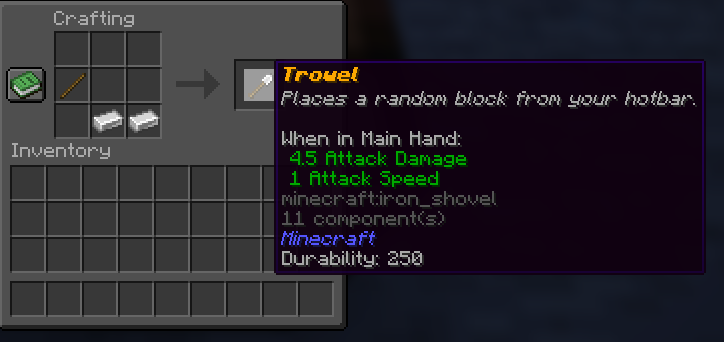
Add blocks to your hotbar.
Use the Trowel to place random blocks adjacent to your targeted block.
Commands
- /givetrowel: Gives the Trowel to the player.
Permissions
trowel.give: Allows access to the/givetrowelcommand.
Installation
- Download the plugin JAR file.
- Place it in your Paper server's
pluginsdirectory. - Restart your server to enable the plugin.
Compatibility
- Minecraft Paper Server 1.21+
- Should work on older versions as well but has not been tested.
Custom Models are also possible Custom model Data is: 12345
License
This plugin is licensed under the MIT License.
- Edition: Minecraft Java
- File type: .jar
- Minecraft version listed: 1.21.1
- How to install: Install the matching mod loader (Forge, Fabric or NeoForge) for your Minecraft version. → Download the .jar. → Put it in the .minecraft/mods folder and launch that loader profile.
- Where to get it: Opens on Modrinth — not every file is mirrored on our own servers.
Install steps are the general flow for this file type — How to install Minecraft Java mods & modpacks walks through it step by step.
- Ships as trowel-1.0.1.jar — drop this file into the mods folder
- Download size: 6 KB
- Download link checked 10 Sept 2026 — working
These come from our own check of the pack file, not from the source page.