
Xp-Warps
Java mod listed for Minecraft 1.21. Downloads from the MC Java Mods app on Android.
XP-Warps Plugin Developed by MineFlow Studios XP-Warps is a Bukkit plugin that enhances your Minecraft server by allowing players to create, manage, and…
⬇ Download on Modrinth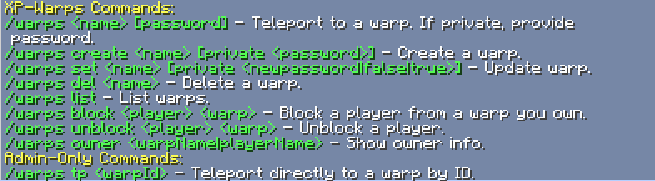
XP-Warps Plugin Documentation
Developed by MineFlow Studios
Overview
XP-Warps enables players to create, manage, and teleport to custom warps using XP or levels. Supports public/private warps, teleport cooldowns, and player blocking.
Installation
- Download the
XP-Warps.jarfile. - Place the JAR in your server's
pluginsfolder. - Start your Minecraft server. Configuration files (
warps.ymlandsettings.yml) will be generated automatically.
Configuration
Located in plugins/XP-Warps/.
settings.yml
tp-cooldown: "5s"
costs:
  create: "20l"
  set: "10l"
  del: "5l"
  teleport: "2l"
warps.yml
- Automatically managed by the plugin. Stores warp details like name, location, privacy, and blocked players.
Commands
General Commands:
/warps
Displays help information./warps <warpName> [password]
Teleports to the specified warp. Password required for private warps./warps create <warpName> [private <password>]
Creates a new warp. Optionally make it private with a password./warps set <warpName> [private <newpassword|false|true>]
Updates warp location or privacy settings./warps del <warpName>
Deletes the specified warp./warps list
Lists all accessible warps./warps block <playerName> <warpName>
Blocks a player from accessing a specific warp./warps unblock <playerName> <warpName>
Unblocks a player from a specific warp./warps owner <warpName|playerName>
Displays the owner of a warp or lists warps owned by a player.
Admin Commands:
/warps tp <warpId>
Teleports admin directly to a warp using its unique ID./reloadwarp
Reloads the plugin’s configuration files.
Permissions
| Permission Node | Description | Default Access |
|---|---|---|
warp.admin |
Grants access to admin-level commands. | Operators/Admins |
Setting Permissions Example (LuckPerms):
lp group admin permission set warp.admin true
Enjoy using XP-Warps on your Minecraft server!
- Edition: Minecraft Java
- File type: .jar
- Minecraft versions listed: 1.21, 1.21.1, 1.21.2
- How to install: Install the matching mod loader (Forge, Fabric or NeoForge) for your Minecraft version. → Download the .jar. → Put it in the .minecraft/mods folder and launch that loader profile.
- Where to get it: Opens on Modrinth — not every file is mirrored on our own servers.
Install steps are the general flow for this file type — How to install Minecraft Java mods & modpacks walks through it step by step.
- Ships as XP-Warps-1.0.0.jar — drop this file into the mods folder
- Download size: 1.3 MB
- Download link checked 10 Nov 2026 — working
These come from our own check of the pack file, not from the source page.