
AdmnMax
Java mod listed for Minecraft 1.21. Downloads from the MC Java Mods app on Android.
A powerful Minecraft admin plugin that gives you full control over players with features like mob spawning, movement locking, banning, inventory viewing…
⬇ Download on Modrinth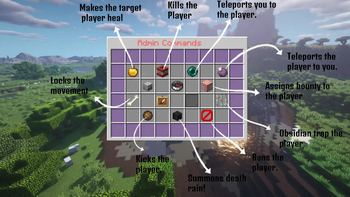

AdminMAX – The Ultimate Admin Control Panel for Minecraft Servers
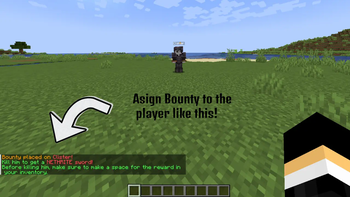
AdminMAX is a powerful and visually-enhanced Minecraft plugin designed to provide server administrators with a comprehensive suite of tools—all accessible from a sleek in-game GUI. Whether you’re moderating a large community or managing a private server, AdminMAX equips you with everything needed to maintain control, enforce rules, and interact with players seamlessly.
-> Main Features: -> Modern Admin Panel GUI Intuitive chest-based menu for easy navigation.
Stylish dark-themed interface for better visibility.
-> Player Moderation Tools Freeze Players – Lock a player’s movement instantly.
Kick/Ban/Unban – Manage disruptive players with one click.
Teleport – Instantly teleport to any player or bring them to you.
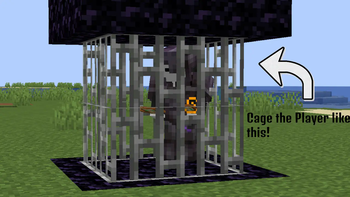
Cage Players – Trap players in iron bar cages for dramatic punishment or warning.
-> Visual Effects & Feedback Cloud Particles – Spawn colored particles above players.
Arrow Rain – Create a circular rain of arrows for epic dramatic effect.
Lingering Potions – Drop potions from above to apply area effects.
-> Combat Control Summon Mobs – Spawn skeletons or other entities to challenge players.
Cooldown Management – Prevent abuse by adding cooldowns to certain actions.
** USAGE : /adminpanel OR /admingui
--> This will open the action center for the player entered**
- Edition: Minecraft Java
- File type: .jar
- Minecraft versions listed: 1.21, 1.21.1, 1.21.2
- How to install: Install the matching mod loader (Forge, Fabric or NeoForge) for your Minecraft version. → Download the .jar. → Put it in the .minecraft/mods folder and launch that loader profile.
- Where to get it: Opens on Modrinth — not every file is mirrored on our own servers.
Install steps are the general flow for this file type — How to install Minecraft Java mods & modpacks walks through it step by step.
- Ships as AdminMAX.jar — drop this file into the mods folder
- Download size: 49 KB
- Download link checked 10 Nov 2026 — working
These come from our own check of the pack file, not from the source page.