
ModsJava
Crafted Stats
Java mod listed for Minecraft 1.20–1.21. Downloads from the MC Java Mods app on Android.
⬇ Download on Modrinth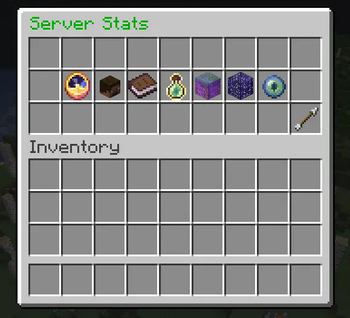
Crafted Stats
In-Game Server Statistics GUI for Bukkit/Spigot/Paper
Description
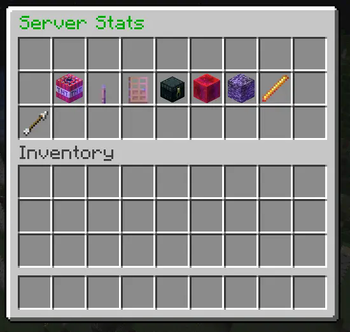
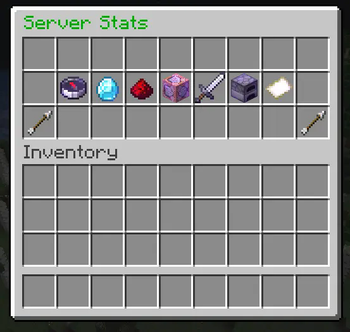
Crafted Stats is a sleek and lightweight Minecraft plugin that delivers detailed server statistics right inside the game. Easily browse through multiple pages of valuable information such as uptime, player data, server performance, world details, plugin count, and more — all accessible via an intuitive GUI.
Features
- Real-time server uptime and TPS monitoring
- Detailed player stats including online count, unique joins, and operators
- World info such as loaded chunks, world borders, and difficulty
- Insight into server version, MOTD, loaded plugins, and banned players
- Multi-page GUI with simple next/previous navigation
- Dynamic updates with minimal server load
- Easy to use and configure
Commands
/serverstats— Opens the Crafted Stats GUI
Requirements
- Bukkit / Spigot / Paper 1.19+
Installation
- Place the plugin jar into your server’s
pluginsfolder - Restart or reload your server
- Run
/serverstatsin-game to open the stats interface
Support
Having trouble ? Please concact the Developer via Discord ( _cow_0990
Quick facts
- Edition: Minecraft Java
- File type: .jar
- Minecraft versions listed: 1.20, 1.20.1, 1.20.2
- How to install: Install the matching mod loader (Forge, Fabric or NeoForge) for your Minecraft version. → Download the .jar. → Put it in the .minecraft/mods folder and launch that loader profile.
- Where to get it: Opens on Modrinth — not every file is mirrored on our own servers.
Install steps are the general flow for this file type — How to install Minecraft Java mods & modpacks walks through it step by step.
File checked by MCModsHub
- Ships as ServerStats-0.1.jar — drop this file into the mods folder
- Download size: 10 KB
- Download link checked 10 Nov 2026 — working
These come from our own check of the pack file, not from the source page.