
AntiRacism
A plugin for Spigot that detects if a player has said the forbidden n word (modifiable) and then it allows you to select the command that will be executed…
⬇ Download on Modrinth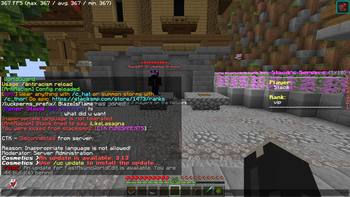
AntiRacism Plugin
AntiRacism is a simple but powerful plugin for blocking racist and inappropriate words on your Minecraft server.
If a player says a banned word, the plugin will:
- Cancel the message
- Execute a custom command (kick, warn, ban, etc.)
- Alert online staff with permission
- Optionally ping a Discord webhook with details
Features
- 🔒 Automatically blocks custom offensive words
- ⚠️ Alerts staff with
antiracism.alertpermission - ⚙️ Fully configurable in
config.yml - 🌐 Optional Discord webhook support
- 🔁
/antiracism reloadcommand
Configuration (config.yml)
blocked-words:
  - (can't show here duo to modrinth moderation)

command-on-detection: "kick %player% Inappropriate language is not allowed!"

discord-webhook: "https://discord.com/api/webhooks/..."
Installation
- Download the plugin
.jarfile. - Drop it into your
/pluginsfolder. - Start or restart your server.
- Edit
config.ymlto add words or customize the command/webhook. - Run
/antiracism reloadto apply config changes.
Example Use Cases
- Instantly kick players for using hate speech
- Notify staff in-game when a rule is broken
- Send alerts to your moderation Discord channel
Author
Made with care by Stacik
Suggestions & Contributions
Got feedback or ideas? DM me on Discord: stacik_
Hate speech doesn't belong in Minecraft — let's keep the community clean and safe.
Shoutout to BlazeIsFlame for being forcefully made to test my god awful coding skills.
- Edition: Minecraft Java
- File type: .jar
- Minecraft versions listed: 1.13, 1.13.1, 1.13.2
- How to install: Install the matching mod loader (Forge, Fabric or NeoForge) for your Minecraft version. → Download the .jar. → Put it in the .minecraft/mods folder and launch that loader profile.
- Where to get it: Opens on Modrinth — not every file is mirrored on our own servers.
Install steps are the general flow for this file type — How to install Minecraft Java mods & modpacks walks through it step by step.
- Ships as AntiRacismPaper-1.0-SNAPSHOT.jar — drop this file into the mods folder
- Download size: 5 KB
- Download link checked 10 Sept 2026 — working
These come from our own check of the pack file, not from the source page.