

Wavepoint
Wavepoint is a new, simplistic waypoint plugin designed to make playing Minecraft easier.




Commands
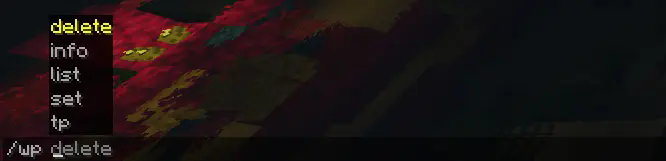
Wavepoint uses one command, /wp, to manage waypoints:
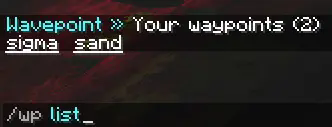
/wp list: Lists the current waypoints that you have
/wp set <name>: Sets a waypoint at your location
/wp tp <name>: Teleports the player to a waypoint they own
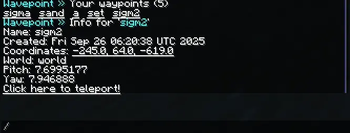
/wp info <name>: Get information about a specific waypoint
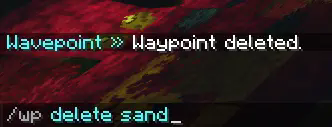
/wp delete <name>: Deletes a waypoint that the player owns
Integrations
Wavepoint has the ability to integrate with some plugins to provide extra functionality:
- Vault (economy)
- CombatLogX (combat logging)
# Below are integrations that work with other plugins.
# If the integration is enabled, but the plugin or requirements aren't met, nothing will happen.
integrations:
  vault:              # | https://www.spigotmc.org/resources/vault.34315/
    enabled: true       # Whether to integrate with Vault, for economy purposes.
    charge_amount: 5    # How much money to charge the user per teleport.
  combatlogx:         # | https://www.spigotmc.org/resources/combatlogx.31689/
    enabled: true       # Whether to integrate with CombatLogX.
    combat:
      # False = restricted
      set: false        # Whether to restrict setting waypoints during combat. false = restricted.
      teleport: false   # Whether to restrict teleporting to waypoints during combat. false = restricted.
More integrations may be added in the future.
Permissions
Wavepoint comes with a variety of permissions that can be used with a permissions plugin like LuckPerms to limit or restrict what users can do, those being:
waypoint.wp: Allows usage of the main /wp command
waypoint.wp.tp: Allows usage of /wp tp
waypoint.wp.set: Allows usage of /wp set
waypoint.wp.list: Allows usage of /wp list
waypoint.wp.delete: Allows usage of /wp delete
waypoint.wp.info: Allows usage of /wp info
Command Executions
Wavepoint has the ability to execute console commands if a player does a specific action, with two placeholders:
${player} and ${playerId}
This can be set in the config.yml file:
# Allows the server to execute a command on a specific event. ${player} and ${playerId} are valid placeholders.
commands:
  teleport:
  - ''  # For example kick ${player} No teleporting!
  set:
  - ''  # For example say ${player} has set a waypoint!
  list:
  - ''  # For example say Hey ${player}, what you looking at??
  delete:
  - ''  # For example say Waypoint is now gone!
  info:
  - ''  # For example say ${player} is really interested in this waypoint!
If you would like to view the full config.yml, you can view it here.
Language
Wavepoint contains a language file that can be modified at any time! You can find it under languages/en_us.yml in the plugins folder.
AI Usage
AI mostly helped with Tab Completions (which I still don't know how to turn off).
However, it was not used to make the majority of Wavepoint. Most of the code is human-made.
API
Wavepoint does have an API, and you can check out the functions here.
This project is licensed under the MIT License.
- Edition: Minecraft Java
- File type: .jar
- Minecraft version listed: 1.21.8
- How to install: Install the matching mod loader (Forge, Fabric or NeoForge) for your Minecraft version. → Download the .jar. → Put it in the .minecraft/mods folder and launch that loader profile.
- Where to get it: Opens on Modrinth — not every file is mirrored on our own servers.
Install steps are the general flow for this file type — How to install Minecraft Java mods & modpacks walks through it step by step.
- Ships as wavepoint-20250926-081632.jar — drop this file into the mods folder
- Download size: 50 KB
- Download link checked 20 Aug 2026 — working
These come from our own check of the pack file, not from the source page.