
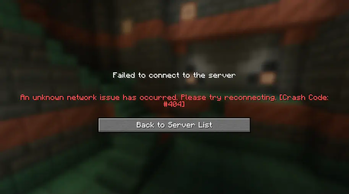
The SoftBan plugin allows server administrators to temporarily prevent players from joining the server without the social implications of a full ban. With just a simple command, you can add players to a softban list, preventing them from logging in while allowing you to maintain control over your server environment. Whether it’s for a short timeout or managing disruptive behavior, SoftBan is the perfect tool for server admins looking for a less confrontational approach.
Features
SoftBan: Prevents specified players from logging into the server.
Simple Commands: Easily add or remove players from the softban list with /addFakeCrash and /removeFakeCrash .
OP Access Only: Commands are restricted to OPs, ensuring that only trusted individuals can manage the softban list.
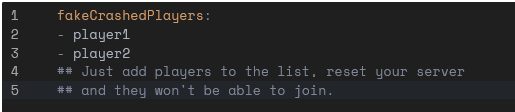
Configurable: Customize the player list via config.yml to manage softbans even when players are offline.
Commands
/addFakeCrash : Adds a player to the softban list, preventing them from joining the server. /removeFakeCrash : Removes a player from the softban list, allowing them to log in again.
Permissions:
softban.add: Grants permission to use /addFakeCrash.
softban.remove: Grants permission to use /removeFakeCrash.
Configuration:
The plugin uses config.yml to maintain the list of players. Players can be added or removed from the list regardless of whether they are online.
Dependencies:
Requires Paper server.
Manage your server effectively and gracefully without the harshness of a Permaban.
- Edition: Minecraft Java
- File type: .jar
- Minecraft version listed: 1.21.1
- How to install: Install the matching mod loader (Forge, Fabric or NeoForge) for your Minecraft version. → Download the .jar. → Put it in the .minecraft/mods folder and launch that loader profile.
- Where to get it: Opens on Modrinth — not every file is mirrored on our own servers.
Install steps are the general flow for this file type — How to install Minecraft Java mods & modpacks walks through it step by step.
- Ships as softBan-1.3.jar — drop this file into the mods folder
- Download size: 6 KB
- Download link checked 10 Sept 2026 — working
These come from our own check of the pack file, not from the source page.