
This plugin was directly inspired by Auto Trasher but with some tweaks...
How does it work?
Simple, you run the command "/adi" and a UI will open, that looks like a big Chest, and you will be able to drag and drop ONE of the items you want to be deleted automatically when you pick them up. To remove one, you simply right click on it.
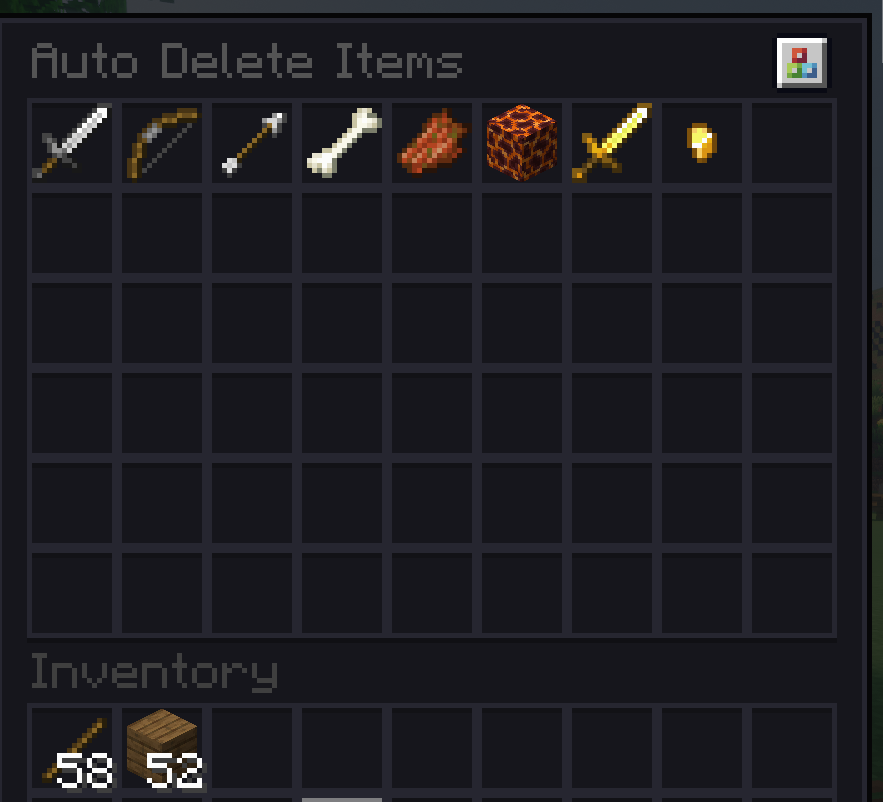
Features:
Up-to-date and modern 1.21.x auto-trash plugin.
This plugin by default IGNORES the durability condition. Meaning that if you add a golden sword, and then you pick up a half-durability golden sword, it will still be deleted. Most of the auto-trash old plugins did not work according to durability. So you ended up with 10 different durability swords on you even thou you did not want to.
I made this plugin able to work with other drop-to-inventory plugins like Drop2Inventory, SDI, etc. So even thou technically you will still get those items in your inventory, they will get instantly deleted.
Commands "/adi on/off" to enable/disable the plugin function individually per player.
Saves added items per player, so it wont reset after the leave the server.
Installation:
- Just drop the .jar into your plugins foldr. Restart the server. test the plugin by running /adi.
Configuration:
- You can change the UI size, sound effects, and durability detection.
cya!

- Edition: Minecraft Java
- File type: .jar
- Minecraft versions listed: 1.21, 1.21.1, 1.21.2
- How to install: Install the matching mod loader (Forge, Fabric or NeoForge) for your Minecraft version. → Download the .jar. → Put it in the .minecraft/mods folder and launch that loader profile.
- Where to get it: Opens on Modrinth — not every file is mirrored on our own servers.
Install steps are the general flow for this file type — How to install Minecraft Java mods & modpacks walks through it step by step.
- Ships as AutoDeleteItems-1.0.0.jar — drop this file into the mods folder
- Download size: 16 KB
- Download link checked 20 Aug 2026 — working
These come from our own check of the pack file, not from the source page.