
Elemental Weather
Elemental Weather enhances your Minecraft experience by introducing special effects tied to the current in-game weather.
⬇ Download on Modrinth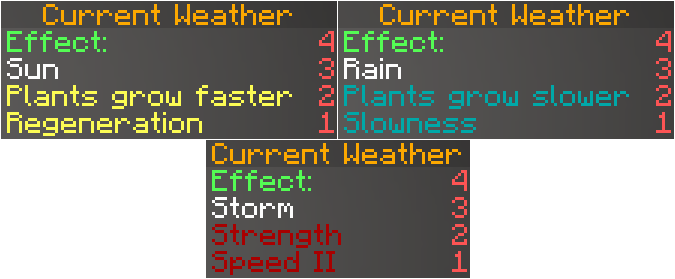
🌦️ Elemental Weather – Minecraft Plugin
[!WARNING]
This project is no longer under development. This plugin is discontinued and will not receive any further updates, bug fixes, or support. The repository remains available for archival purposes and for anyone who wishes to use the existing code as a reference.
Elemental Weather enhances your Minecraft experience by introducing special effects tied to the current in-game weather.
☁️ Weather Effects
☀️ Sun
- Crops grow faster.
- Players receive Regeneration.
🌧️ Rain
- Crop growth is slowed.
- Players receive Slowness.
⛈️ Thunder
- Players receive Strength and Speed II.
📊 Scoreboard
A live scoreboard keeps players informed about the current weather effect and what it does.
It updates automatically and supports multiple languages.

🛠️ Contributing
Pull requests are welcome!
For major changes, please open an issue to discuss your ideas first.
Make sure to update any relevant tests when you make changes.
📄 License
This project is licensed under the GNU General Public License v3.
- Edition: Minecraft Java
- File type: .jar
- Minecraft version listed: 1.21.4
- How to install: Install the matching mod loader (Forge, Fabric or NeoForge) for your Minecraft version. → Download the .jar. → Put it in the .minecraft/mods folder and launch that loader profile.
- Where to get it: Opens on Modrinth — not every file is mirrored on our own servers.
Install steps are the general flow for this file type — How to install Minecraft Java mods & modpacks walks through it step by step.
- Ships as elementalWeather-1.21.4.jar — drop this file into the mods folder
- Download size: 17 KB
- Download link checked 10 Sept 2026 — working
These come from our own check of the pack file, not from the source page.