
MinecraftREST
Java mod listed for Minecraft 1.20. Downloads from the MC Java Mods app on Android.
MinecraftREST, a powerful REST API interface for Minecraft servers that provides secure endpoints for server management and player interactions.
⬇ Download on Modrinth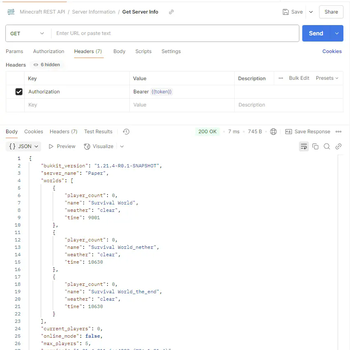
MinecraftREST
The first stable release of MinecraftREST, a powerful REST API interface for Minecraft servers that provides secure endpoints for server management and player interactions.
🚀 Features
- 🔒 Secure JWT Authentication
- 🌐 RESTful API endpoints for server management
- 👥 Player management (kick, gamemode, messaging)
- 📊 Server information and statistics
- ⚡ Rate limiting protection
- 🔍 Real-time player and world data
📋 Requirements
- Java 17 or higher
- Spigot/Paper server 1.20.4
🔧 Installation
- Download the
minecraft-rest-1.0.0.jarfrom this release - Place it in your server's
pluginsfolder - Start/restart your server
- Configure the plugin in
plugins/MinecraftREST/config.yml
Configuration
The plugin creates a config.yml file in plugins/MinecraftREST/ with the following options:
# API Configuration
api-port: 4567  # The port on which the HTTP API will run

# Security Configuration
security:
  jwt-secret: "your-secret-key-here"  # Change this to a secure random string
  max-requests-per-minute: 60  # Rate limiting threshold
  admin-credentials:
    username: "admin"  # Change this to a secure username
    password: "change-this-password"  # Change this to a secure password
⚠️ Important: Change the default security settings before using in production!
API Documentation
The API is documented using the OpenAPI (Swagger) specification. You can find the full API documentation in:
api-docs/swagger.yaml- OpenAPI 3.0 specification file- Import this file into tools like:
Quick API Overview
All endpoints except /api/auth/login require JWT authentication via Bearer token.
Authentication
POST /api/auth/login- Get JWT token
Server Management
GET /api/server/info- Get server informationPOST /api/server/command- Execute console commandPOST /api/broadcast- Broadcast message
Player Management
GET /api/players- List online playersPOST /api/player/message- Send message to playerPOST /api/player/kick- Kick playerPOST /api/player/gamemode- Change player gamemode
- Edition: Minecraft Java
- File type: .jar
- Minecraft versions listed: 1.20, 1.20.1, 1.20.2
- How to install: Install the matching mod loader (Forge, Fabric or NeoForge) for your Minecraft version. → Download the .jar. → Put it in the .minecraft/mods folder and launch that loader profile.
- Where to get it: Opens on Modrinth — not every file is mirrored on our own servers.
Install steps are the general flow for this file type — How to install Minecraft Java mods & modpacks walks through it step by step.
- Ships as minecraft-rest-1.0.1.jar — drop this file into the mods folder
- Download size: 8.6 MB
- Download link checked 21 Oct 2026 — working
These come from our own check of the pack file, not from the source page.