
Tick Control is a Random Tick Controller Plugin For Minecraft
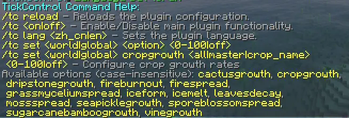
Command Help:
/tc reload - Reloads the plugin configuration.
/tc <on|off> - Enable/Disable main plugin functionality.
/tc lang <zh_cn|en> - Sets the plugin language.
/tc set <world|global> <0-100%|off>
/tc set <world|global> cropgrowth <all|master|crop_name> <0-100%|off> - Configure crop growth rates
Available options (case-insensitive): cactusgrowth, cauldroninteract, copperoxidation, cropgrowth, dripstonegrowth, farmlandhydration, fireburnout,
firespread, grassmyceliumspread, iceform, icemelt, leavesdecay, mossspread, nyliumfungigrowth, redstoneoreglow, seapicklegrowth, sporeblossomspread, sugarcanebambo
ogrowth, turtleegghatch, twistingvinegrowth, vinegrowth, weepingvinegrowth
- Edition: Minecraft Java
- File type: .jar
- Minecraft versions listed: 1.19, 1.19.1, 1.19.2
- How to install: Install the matching mod loader (Forge, Fabric or NeoForge) for your Minecraft version. → Download the .jar. → Put it in the .minecraft/mods folder and launch that loader profile.
- Where to get it: Opens on Modrinth — not every file is mirrored on our own servers.
Install steps are the general flow for this file type — How to install Minecraft Java mods & modpacks walks through it step by step.
- Ships as tickcontrolplugin-1.0.0.jar — drop this file into the mods folder
- Download size: 33 KB
- Download link checked 10 Sept 2026 — working
These come from our own check of the pack file, not from the source page.