

AdvancedClear Plugin
 Overview:
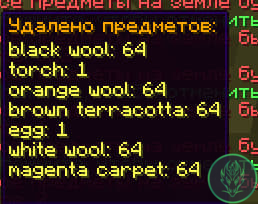
AdvancedClear is a Minecraft plugin designed to help server administrators keep their worlds clean by automatically removing dropped items at configurable intervals. The plugin also allows players to cancel upcoming cleanups and provides detailed feedback on the cleanup process, including which items were removed and who canceled the cleanup.
Overview:
AdvancedClear is a Minecraft plugin designed to help server administrators keep their worlds clean by automatically removing dropped items at configurable intervals. The plugin also allows players to cancel upcoming cleanups and provides detailed feedback on the cleanup process, including which items were removed and who canceled the cleanup.
Features:
Scheduled Cleanups:
- Automatically clears dropped items at configurable intervals.
- Sends warnings to players before the cleanup occurs, allowing them to cancel if necessary.
Custom Messages:
- Customizable messages in multiple languages (English and Russian).
- In-game notifications using
tellrawcommands for enhanced message formatting and clickable events.
Player Interaction:
- Players can cancel the upcoming cleanup by clicking a special message or using the
/cancelcleanupcommand. - Logs the player who canceled the cleanup and provides this information via placeholders.
- Players can cancel the upcoming cleanup by clicking a special message or using the
Logging:
- Logs all cleanup actions and cancellations to a file for later review.

- PlaceholderAPI Integration:
- Integrates with PlaceholderAPI to provide placeholders for time until the next cleanup and the last player who canceled a cleanup.
Installation:
- Download the AdvancedClear plugin.
- Place the downloaded file into your server's
pluginsdirectory. - Start or restart your server to load the plugin.
- Configure the plugin as needed in the generated
config.ymlfile.
Configuration:
- The
config.ymlfile allows server administrators to set the interval for item cleanups and customize messages in different languages.
Usage:
- The plugin automatically schedules item cleanups based on the configured interval.
- Players receive warnings before each cleanup and can cancel it by clicking the provided message or using the
/cancelcleanupcommand. - The plugin logs all cleanup actions and cancellations for review.
Commands:
/cancelcleanup: Cancels the upcoming item cleanup if the player has the necessary permission (advancedclear.cancel).
Placeholders:
%advancedclear_time_until_next_cleanup%: Displays the time remaining until the next cleanup.%advancedclear_last_skipper%: Displays the name of the last player who canceled a cleanup.
Support:
- For any issues or suggestions, please visit the plugin's support page or repository.
Metrics:
- This plugin uses bStats to collect anonymous usage statistics to help improve the plugin.
Example Config (config.yml):
# AdvancedClear configuration
interval: 600  # Time in seconds between each cleanup

messages:
  en:
    message: "Item cleanup will happen soon. Click to cancel."
    item_list_header: "Items removed during cleanup:"
    removed_message: "Items have been cleared. Total removed: "
    cancel_message: "Cleanup has been canceled."
  ru:
    message: "Очистка предметов произойдёт скоро. Нажмите, чтобы отменить."
    item_list_header: "Удалённые предметы во время очистки:"
    removed_message: "Предметы были очищены. Всего удалено: "
    cancel_message: "Очистка была отменена."
AdvancedClear helps keep your server clean and organized by automating item cleanups while providing players with the ability to manage and interact with the cleanup process.
- Edition: Minecraft Java
- File type: .jar
- Minecraft versions listed: 1.20, 1.20.1, 1.20.2
- How to install: Install the matching mod loader (Forge, Fabric or NeoForge) for your Minecraft version. → Download the .jar. → Put it in the .minecraft/mods folder and launch that loader profile.
- Where to get it: Opens on Modrinth — not every file is mirrored on our own servers.
Install steps are the general flow for this file type — How to install Minecraft Java mods & modpacks walks through it step by step.
- Ships as AdvancedClear-1.17-RELEASE (NO_LICENSE).jar — drop this file into the mods folder
- Download size: 14 KB
- Download link checked 20 Aug 2026 — working
These come from our own check of the pack file, not from the source page.