
PlayerTracker-unimilk
PlayerTracker is an esay-to-use plugin for ops in Minecraft servers to get to know the coordinary and status of online players.
I don't know my version or loader


🧭 PlayerTracker Plugin (Capable for Spigot/Paper 1.13.x ~ 1.21.x)
🚀 PlayerTracker is a lightweight Minecraft 1.13.x ~ 1.21.x server plugin that allows administrators to track the coordinates and status of online players.
📋 Overview
📌 Latest Version: v4.1.0
📌 Supported Minecraft Versions: 1.13.x ~ 1.21.x
📌 Compatible Servers: Spigot Paper
📥 Quick Start
1️⃣ Download
👉 Click here to download PlayerTracker.
2️⃣ Installation
- Download the
.jarfile. - Put the
.jarfile in the.\pluginsfolder of your Minecraft server. - Stop and restart your server.
- Try
/playertrackeror/ptin game.
📝 How to Use
🔹 Main Commands
🚀 Both
/playertrackerand/ptwork as valid command prefixes. For convenience, the examples below use/pt.
| Command | Description | Permission Required |
|---|---|---|
/pt track |
Display the coordinary and status of all players online. | playertracker.use |
/pt track <player> |
Display the coordinary and status of the player specified. | playertracker.use |
/pt log <on/off> |
Enable/Disable logging. | playertracker.admin |
/pt log schedule <int> |
Set logging interval to [int] second. Default: 300 | playertracker.admin |
/pt reload |
Reload the config file. | playertracker.admin |
/pt viewer add/remove <player> |
Add/Remove the tracker pointed to the player specified. | playertracker.view |
❗ It is highly recommended to use PlayerTracker with a permission control plugin (such as
LuckPerms, click here for more information) for a more precise permission control than the "OP" by default in Minecraft.
🔹 Feature Details
Basic Tracking
/pt trackWhen a players with
playertracker.usepermission or server console issue/pt trackcommand, it displays all online players' coordinates and status in chat, for example:===== Online Players ===== X_xiaohan521 - World: world - Position: [108 77 -105] - Status: Wandering Go_Karoo - World: world - Position: [247 62 -335] - Status: On Vehicle🚀 Players in game can click the coordinates in chat to copy to clipboard. (Note that Minecraft versions 1.13.x ~ 1.15.x don't support this feature.)
To query a specific player, use
/pt track <player>.Logging
When logging is enabled, player activities are automatically logged at
.\plugins\PlayerTracker\player_activities.log. Refer to "File Syntax" for an explanation of the logging syntax.Players with
playertracker.adminpermission or server console can toggle logging via/pt log on/off.Live Tracker
/pt viewerPlayers with
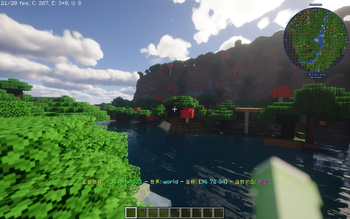
playertracker.viewpermission can issue/pt viewer add <player>in game to display real-time tracking info on-screen, for example:Tracking: X_xiaohan521 - World: world - Position: [96 72 34] - Status: WanderingTo stop tracking, use
/pt viewer remove.Additionally, the BossBar area (on top of the screen) will show the relative direction and distance between the viewer and the target:
- Horizontal Direction:
↑↗→↘↓↙←↖(8 total) - Vertical Direction:
↑↓Level(3 total) - Distance: the straight-line distance between both players
❗ Note: Only one target can be tracked at a time. Adding a new one replaces the previous target.
💡 Heads-up: The viewer uses the
ActionBar(the display area above palyers' hotbar). It may conflict with other plugins that also use the ActionBar.- Horizontal Direction:
📄 File Syntax
⚙️ Configuration File config.yml
📌 Automatically generated at
.\plugins\PlayerTrackeron first launch.
plugin:
  enabled: true   # Enable/Disable the plugin

log:
  enabled: true   # Enable/Disable logging
  schedule: 300   # Logging interval (seconds)
🧾 Log File player_activities.log
📌 Automatically created at
.\plugins\PlayerTrackerwhen the first log entry is written.
Sample Log Entry
[2025-06-23 23:25:08] [X_xiaohan521] [world] [108 79 -90] [Joined Game]Format:
[Time][Player][World][Coordinates][Event]Log Triggers (when logging is enabled)
a. Scheduled Logging
📌 The plugin records all online players' status at intervals defined in
config.yml. Possible status include:- Sleeping
- On Vehicle
- Swimming
- Gliding
- Sprinting
- Sneaking
- Wandering
b. Specific Events
📌 The following events automatically trigger logging:
- Player join/quit
- Player death
- Flight toggle
- Vehicle enter/exit
- Player damage
- Ender pearl usage
- Player attack
- Chet opening
🛠️ Technical Overview
Plugin Structure
PlayerTracker/
├── pom.xml                      # Parent aggregation POM
│
├── playertracker-api/           # Externally exposed API
│   └── src/main/java/unimilk/playertracker/api/
│       ├── viewer/
│       │   ├── ITrackViewer.java
│       │   └── IBossBarManager.java
│       └── util/
│           └── IMessageSender.java
│
├── playertracker-common/        # Common logic implementation, excluding version dependencies
│   └── src/main/java/unimilk/playertracker/
│       ├── PlayerTracker.java   # Plugin Main Class
│       ├── command/
│       │   ├── CommandHandler.java
│       │   └── CommandTabCompleter.java
│       ├── log/
│       │   └── ActivityLogger.java
│       ├── util/
│       │   ├── DirectionDistanceCalc.java
│       │   └── EventListener.java
│       └── core/
│           └── VersionManager.java    # Dynamically load different version implementations
│
├── playertracker-v1_13_15/      # Implementation dedicated to versions 1.13~1.15
│   └── src/main/java/unimilk/playertracker/impl/v1_13_15/
│       ├── viewer/
│       │   ├── TrackViewerImpl.java
│       │   └── BossBarManagerImpl.java
│       └── util/
│           └── MessageSenderImpl.java
│
├── playertracker-v1_16_21/      # Universal implementation for 1.16~1.21
│   └── src/main/java/unimilk/playertracker/impl/v1_16_21/
│       ├── viewer/
│       │   ├── TrackViewerImpl.java
│       │   └── BossBarManagerImpl.java
│       └── util/
│           └── MessageSenderImpl.java
│
└── playertracker-assembly/       # Final packaging module
    └── src/main/resources/plugin.yml
Data Structure
  Time
  Name
  Location
  ├── world
  └──coordinary
  Activity
  ├──status
  └──event

  Direction
  Distance
❓ FAQ
Q: Will the viewer be kept after a player quit?
A: If it is the player who created the viewer quit, the viewer won't be kept, and you would have to re-add the viewer after rejoin. But if it is the target quit, the viewer will be reactivated once the target rejoin.
Q: Does the log file clean itself regularly?
A: Not yet. You need to clear it manually. Auto-clean is planned for future versions.
Q: How often does the viewer refresh?
A: It updates only when either the tracker or target moves.
Q: Will other game versions be supported?
A: Yes, support for more versions is planned.
📜 Changelog
📌 Only the latest version is listed here. See
CHANGELOG.mdfor older versions.
[4.1.0] - 2025-11-12
🌟 Improvements
- Added compatibility for Minecraft
1.13.x ~ 1.21.x. - Reconstruct plugin structure for better organization.
- Added English
README.md.
🛠 Bugfixes
- Fixed plugin loading issues on servers of
1.13.x~1.15.x. - Fixed bugs when issuing
/pt trackon servers of1.13.x~1.15.x.
💡 Contributing
Want to help improve this plugin? Submit an Issue or Pull Request via GitHub.
- 🐛 Report issues: 🔗 GitHub Issues
- 💡 Suggest new features: 🔗 GitHub Issues
- 💬 Join discussions: 🔗 Github discussions
- 🧩 Contribute code: Fork and submit a 🔗 Pull Request
📜 License
This plugin is released under the Unlicense.
Anyone is free to copy, modify, publish, use, compile, sell, or distribute this software, either in source code form or as a compiled binary, for any purpose, commercial or non-commercial, and by any means.
📞 Contact Me
📧 Email: unimilk891@gmail.com
🌐 GitHub: X-xiaohan521
⭐ Final Words
Thank you for using PlayerTracker!
If you find this plugin helpful, please star ⭐ ths repository or leave your feedback — your support means a lot to me! 🚀
- Edition: Minecraft Java
- File type: .jar
- Minecraft versions listed: 1.13, 1.13.1, 1.13.2
- How to install: Install the matching mod loader (Forge, Fabric or NeoForge) for your Minecraft version. → Download the .jar. → Put it in the .minecraft/mods folder and launch that loader profile.
- Where to get it: Opens on Modrinth — not every file is mirrored on our own servers.
Install steps are the general flow for this file type — How to install Minecraft Java mods & modpacks walks through it step by step.
- Ships as PlayerTracker-4.1.0.jar — drop this file into the mods folder
- Download size: 33 KB
- Download link checked 11 Sept 2026 — working
These come from our own check of the pack file, not from the source page.